# Codex 协作本机浏览器极简操作指南

用 Roxy 把一个本机浏览器窗口交给 Codex 协作。

> 窗口可保持在后台，不影响你同时使用电脑。你和 Codex 都能操作同一窗口；遇到登录、人机验证或其他敏感操作时，可随时手动接管，完成后再让 Codex 继续。

Codex 自带 Chrome 扩展和内置浏览器有时会连接不上，稳定性不高；涉及已登录会话、多个标签页或连续操作时，Roxy 通常更稳。

---

<div id="bkmrk-%E4%B8%A5%E7%A6%81%E6%93%8D%E4%BD%9C%E5%9F%BA%E7%A1%80%E6%A8%A1%E5%9E%8B%E5%88%86%E5%8F%91%E8%B4%A6%E5%8F%B7%E6%8F%90%E4%BE%9B%E7%9A%84-chat" role="note" style="margin:0 0 20px 0;padding:16px 18px;background:#fff1f0;border:2px solid #d92d20;border-left:8px solid #b42318;border-radius:4px;color:#7a271a;">**严禁利用 Codex 自动化操作基础模型分发账号提供的 ChatGPT 网页端**

**风险提示：**OpenAI 的 ChatGPT 网页端有强力的人机识别检验；被识别可能导致封号。

</div>## 一、三步完成

<details id="bkmrk-%E7%82%B9%E5%87%BB%E5%B1%95%E5%BC%80%EF%BC%9A%E5%88%9B%E5%BB%BA%E5%B9%B6%E6%89%93%E5%BC%80%E7%AA%97%E5%8F%A3-%E5%9B%BE-1%EF%BC%9A%E5%BF%AB%E9%80%9F%E5%88%9B"><summary>点击展开：创建并打开窗口</summary>

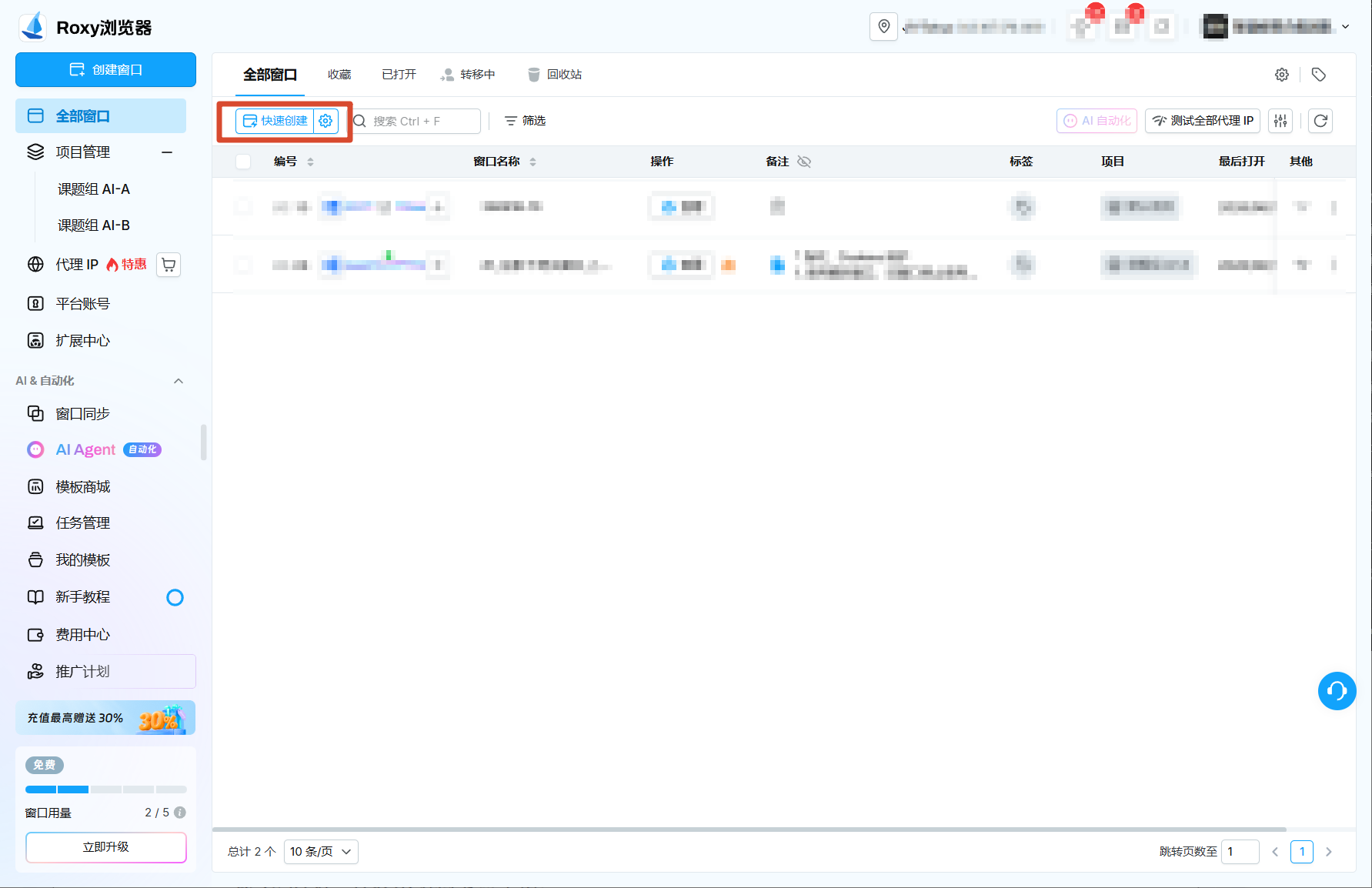
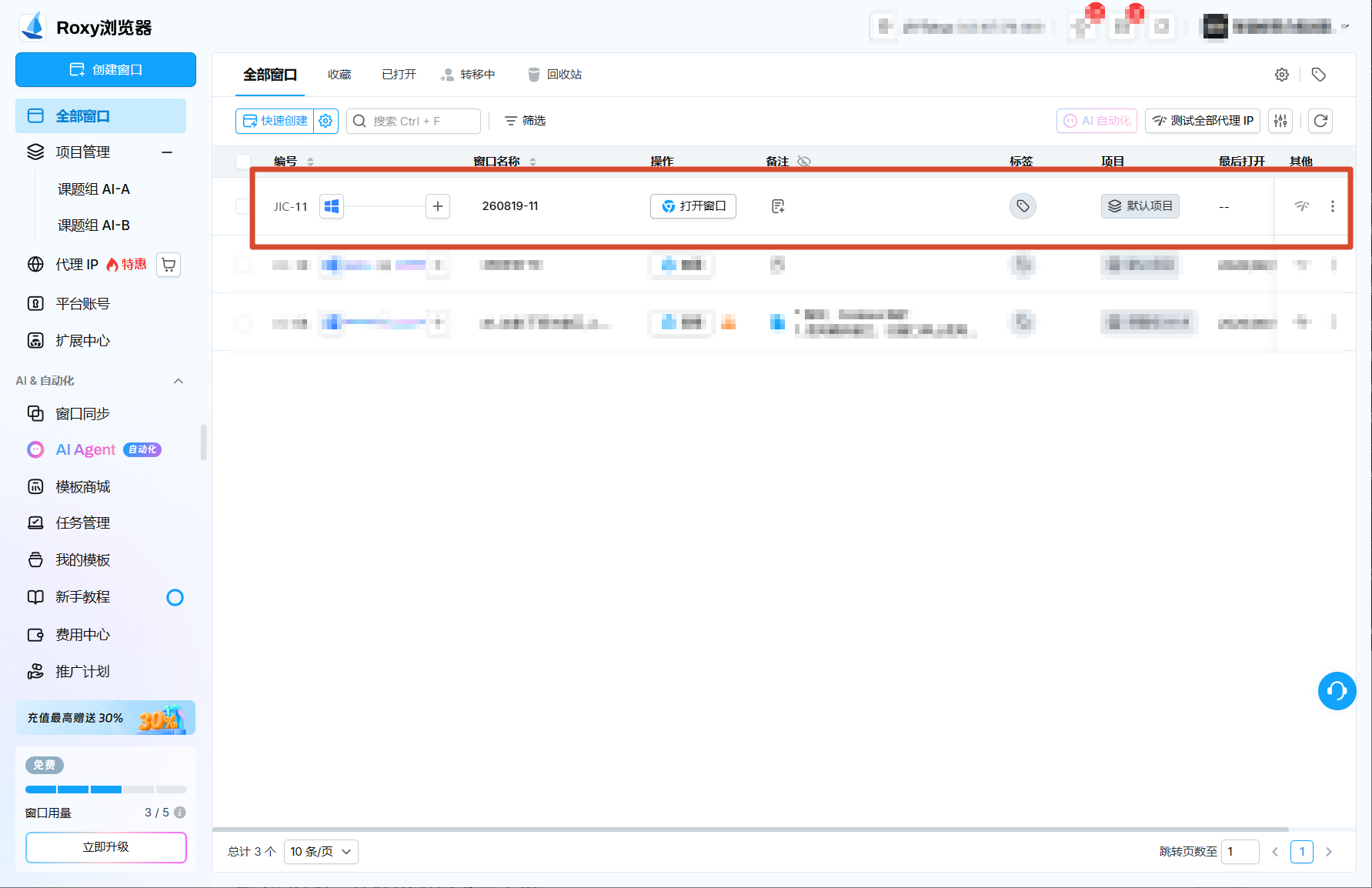
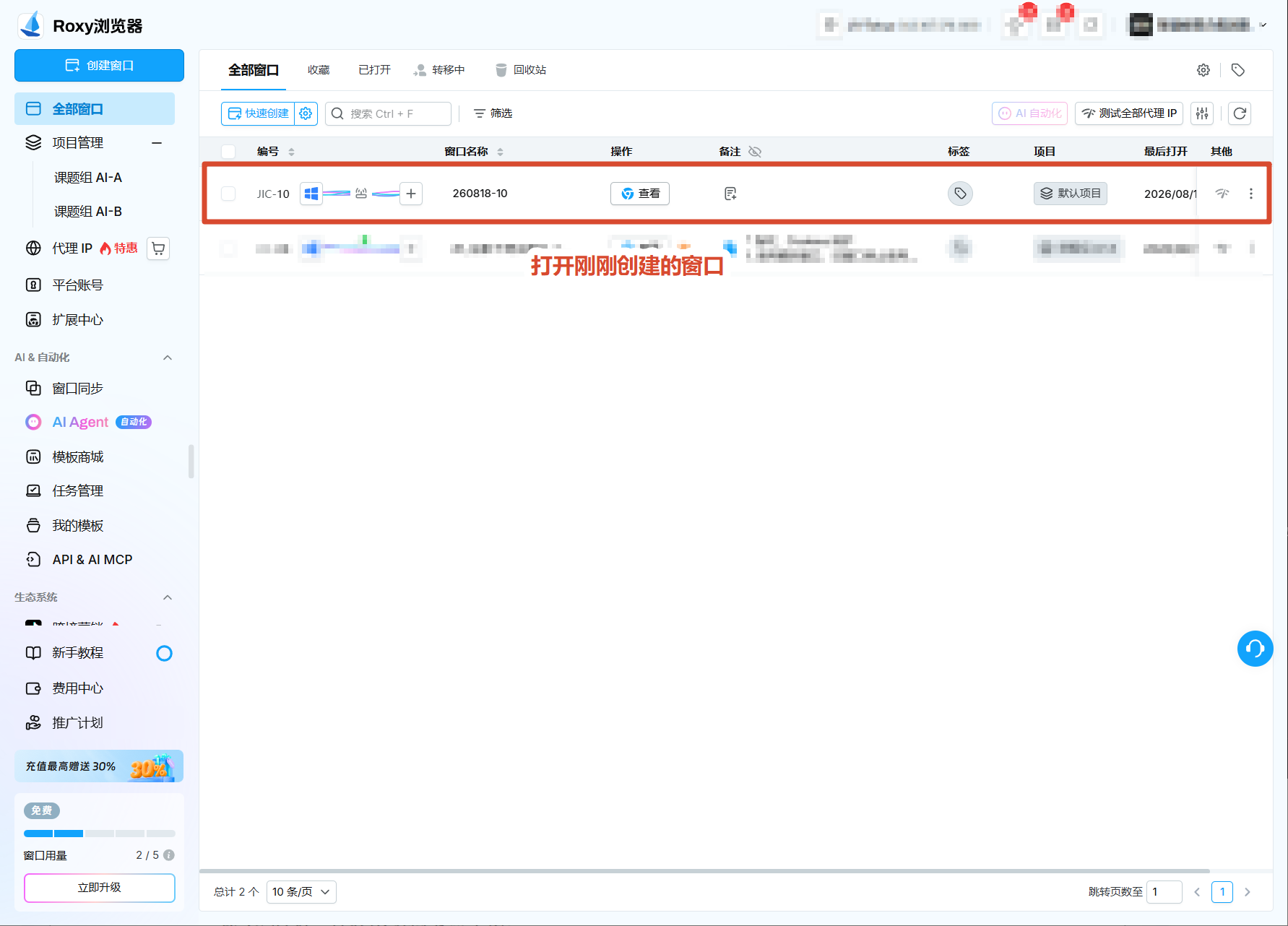
<figure style="margin: 10px 0 16px 0; text-align: center;">[![快速创建窗口](https://docs.20020519.xyz/uploads/images/gallery/2026-08/codex-roxy-guide-01-quick-create.png)](https://docs.20020519.xyz/uploads/images/gallery/2026-08/codex-roxy-guide-01-quick-create.png)<figcaption style="text-align: center; color: #57606a; font-size: 0.9em; margin-top: 6px;">图 1：快速创建。</figcaption></figure><figure style="margin: 10px 0 16px 0; text-align: center;">[![记录窗口编号](https://docs.20020519.xyz/uploads/images/gallery/2026-08/codex-roxy-guide-02-window-created.png)](https://docs.20020519.xyz/uploads/images/gallery/2026-08/codex-roxy-guide-02-window-created.png)<figcaption style="text-align: center; color: #57606a; font-size: 0.9em; margin-top: 6px;">图 2：记住窗口名称或编号。</figcaption></figure><figure style="margin: 10px 0 16px 0; text-align: center;">[![打开创建的窗口](https://docs.20020519.xyz/uploads/images/gallery/2026-08/codex-roxy-guide-05-open-window.png)](https://docs.20020519.xyz/uploads/images/gallery/2026-08/codex-roxy-guide-05-open-window.png)<figcaption style="text-align: center; color: #57606a; font-size: 0.9em; margin-top: 6px;">图 3：打开窗口并自行登录。</figcaption></figure></details><details id="bkmrk-%E7%82%B9%E5%87%BB%E5%B1%95%E5%BC%80%EF%BC%9A%E6%8E%A5%E5%85%A5-codex-mcp-%E5%9B%BE-"><summary>点击展开：接入 Codex MCP</summary>

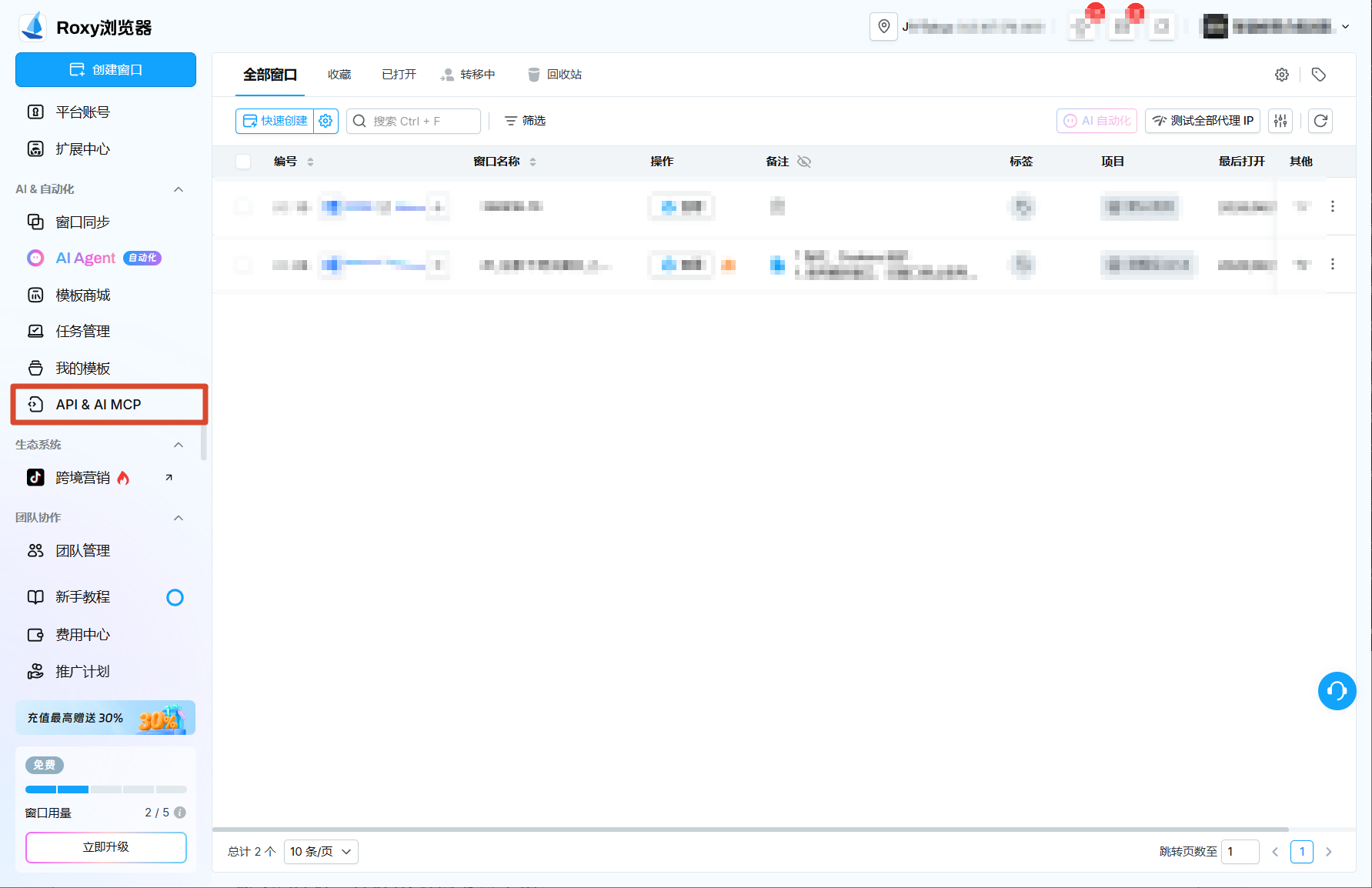
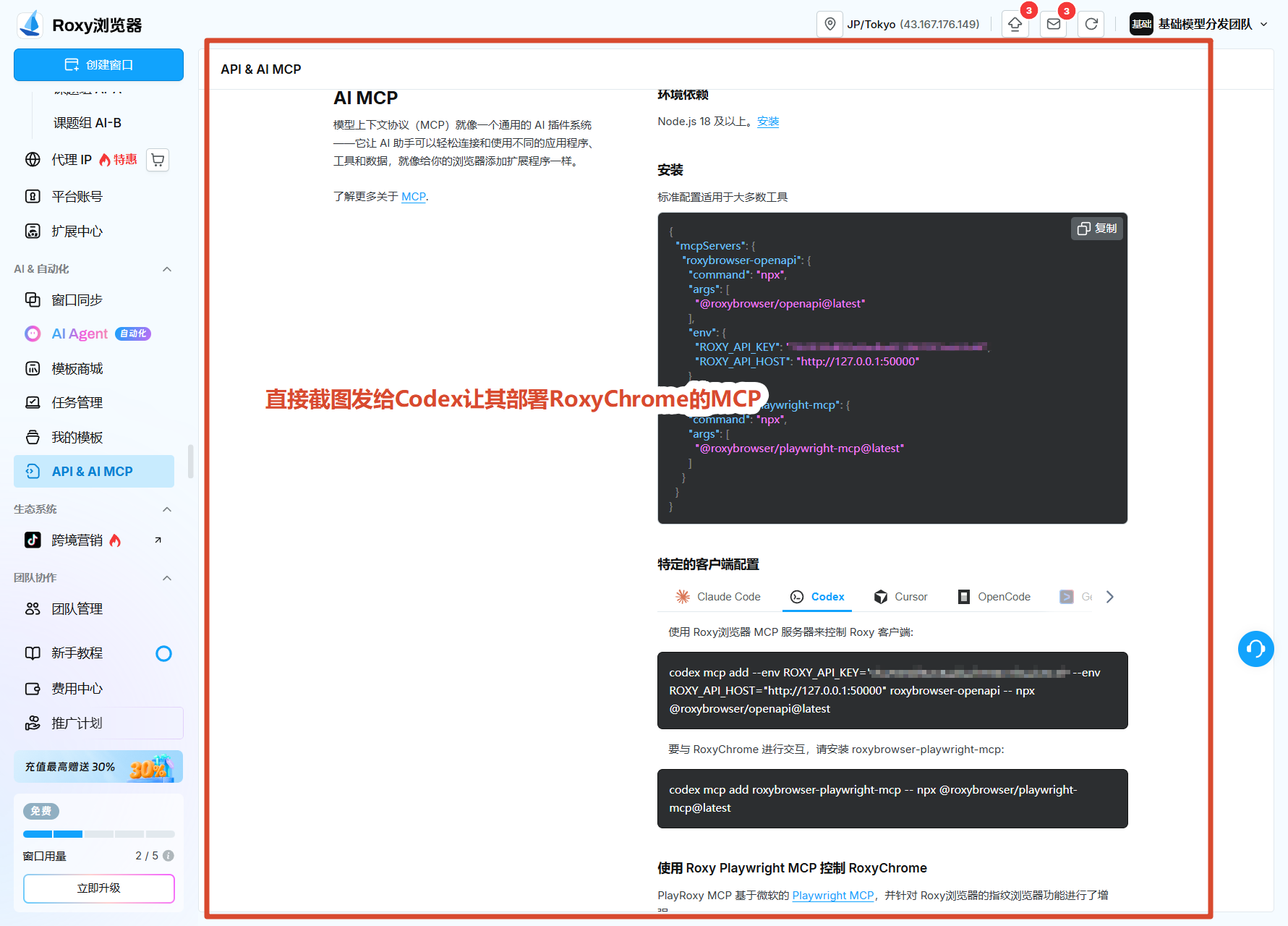
<figure style="margin: 10px 0 16px 0; text-align: center;">[![API 与 AI MCP 菜单](https://docs.20020519.xyz/uploads/images/gallery/2026-08/codex-roxy-guide-03-api-mcp-menu.png)](https://docs.20020519.xyz/uploads/images/gallery/2026-08/codex-roxy-guide-03-api-mcp-menu.png)<figcaption style="text-align: center; color: #57606a; font-size: 0.9em; margin-top: 6px;">图 4：进入「API &amp; AI MCP」。</figcaption></figure><figure style="margin: 10px 0 16px 0; text-align: center;">[![Codex MCP 配置](https://docs.20020519.xyz/uploads/images/gallery/2026-08/codex-roxy-guide-04-codex-mcp-config.png)](https://docs.20020519.xyz/uploads/images/gallery/2026-08/codex-roxy-guide-04-codex-mcp-config.png)<figcaption style="text-align: center; color: #57606a; font-size: 0.9em; margin-top: 6px;">图 5：把这张配置页截图发给 Codex，让它部署 MCP。</figcaption></figure>```text
请根据这张 Roxy「Codex MCP」配置页截图，在当前 Codex 中部署这个 MCP；完成后确认连接正常。
```

</details><details id="bkmrk-%E7%82%B9%E5%87%BB%E5%B1%95%E5%BC%80%EF%BC%9A%E7%99%BB%E5%BD%95%E5%90%8E%E4%BA%A4%E7%BB%99-codex-%E5%9B%BE-6"><summary>点击展开：登录后交给 Codex</summary>

人机协作：先登录账号，再将窗口编号、目标标签页和操作范围交给 Codex，由 Codex 完成后续任务。

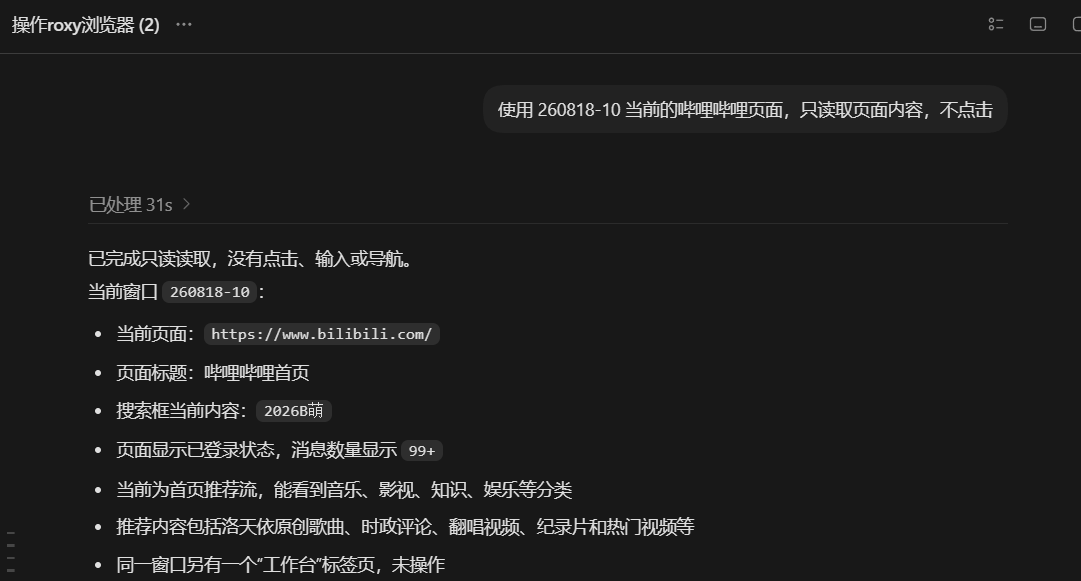
<figure style="margin: 10px 0 16px 0; text-align: center;">[![已登录网页](https://docs.20020519.xyz/uploads/images/gallery/2026-08/codex-roxy-guide-06-logged-in-page.png)](https://docs.20020519.xyz/uploads/images/gallery/2026-08/codex-roxy-guide-06-logged-in-page.png)<figcaption style="text-align: center; color: #57606a; font-size: 0.9em; margin-top: 6px;">图 6：窗口保留登录状态。</figcaption></figure><figure style="margin: 10px 0 16px 0; text-align: center;">[![Codex 按明确范围只读页面，不执行点击](https://docs.20020519.xyz/uploads/images/gallery/2026-08/codex-roxy-guide-07-codex-readonly-task.png)](https://docs.20020519.xyz/uploads/images/gallery/2026-08/codex-roxy-guide-07-codex-readonly-task.png)<figcaption style="text-align: center; color: #57606a; font-size: 0.9em; margin-top: 6px;">图 7：交给 Codex 后，可按明确范围只读页面，不执行点击。</figcaption></figure>```text
使用 260818-10 当前的哔哩哔哩页面，只读取页面内容，不点击
```

</details>---

## 二、模型选择

**推荐 GPT-5.6 Luna Max：**快、省，完成这类任务已经足够；**Terra、Sol 等更贵的模型不推荐在此类任务中使用**。

<figure id="bkmrk-%E5%9B%BE%EF%BC%9Agpt-5.6-luna-%2B-max" style="margin:10px 0 16px 0;text-align:center;"> [![GPT-5.6 Luna Max 的速度、成本与任务能力概览](https://docs.20020519.xyz/uploads/images/gallery/2026-08/page88-luna-max-overview-20260823.png)](https://docs.20020519.xyz/uploads/images/gallery/2026-08/page88-luna-max-overview-20260823.png) <figcaption style="text-align:center;color:#57606a;font-size:0.9em;margin-top:6px;">图：GPT-5.6 Luna + Max 的速度、成本与任务类型概览。</figcaption></figure><figure id="bkmrk-%E5%9B%BE%EF%BC%9A%E5%AE%9E%E9%99%85%E4%BD%BF%E7%94%A8%E8%AE%B0%E5%BD%95%E6%98%BE%E7%A4%BA%EF%BC%8C%E5%9C%A8%E7%9B%B8%E8%BF%91%E7%9A%84-toke" style="margin: 10px 0 16px 0; text-align: center;"> [![GPT-5.6 Luna Max、Terra 与 Sol 的实际费用对比](https://docs.20020519.xyz/uploads/images/gallery/2026-08/page88-luna-max-cost-efficiency-20260822.png)](https://docs.20020519.xyz/uploads/images/gallery/2026-08/page88-luna-max-cost-efficiency-20260822.png) <figcaption style="text-align: center; color: #57606a; font-size: 0.9em; margin-top: 6px;">图：实际使用记录显示，在相近的 Token 量级下，GPT-5.6 Luna Max 的费用明显低于 Terra、Sol。</figcaption></figure>---

## 三、协作功能及部分案例展示

#### 信息检索与整理

- **学校机构账号：**找论文、筛选、下载可直接访问的全文，整理题录并提炼结论。
- **知乎、小红书等论坛调研：**围绕一个问题检索帖子，按时间、互动量和相关性筛选，提取作者、原帖链接、核心观点与争议点，整理成对比清单。
- **网页资料：**跨页面检索，提取字段，汇总成清单或表格。

<details id="bkmrk-%E7%82%B9%E5%87%BB%E5%B1%95%E5%BC%80%EF%BC%9A%E5%B0%8F%E7%BA%A2%E4%B9%A6%E8%B0%83%E7%A0%94%E4%B8%8E%E6%8A%A5%E5%91%8A%E5%AE%9E%E6%93%8D-%E4%B8%8B%E9%9D%A2%E4%BB%A5%E2%80%9C"><summary>点击展开：小红书调研与报告实操</summary>

下面以“大连自助餐调研”为例，展示从确认窗口、提出任务、读取搜索结果，到整理并发送图文报告的完整流程。论坛调研适合交给 Codex 做检索、筛选、对比和整理；遇到登录、验证码、发布或互动操作时，再由你接管。

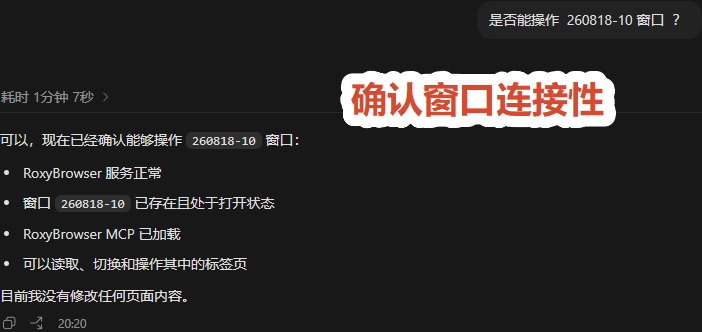
<figure style="margin:10px 0 16px 0;text-align:center;"> [![确认 Roxy 窗口可操作](https://docs.20020519.xyz/uploads/images/gallery/2026-08/page88-forum-research-window-check.jpg)](https://docs.20020519.xyz/uploads/images/gallery/2026-08/page88-forum-research-window-check.jpg) <figcaption style="text-align:center;color:#57606a;font-size:0.9em;margin-top:6px;">图 11：确认 Roxy 窗口可操作。</figcaption></figure>```
是否能操作 260818-10 窗口？
```

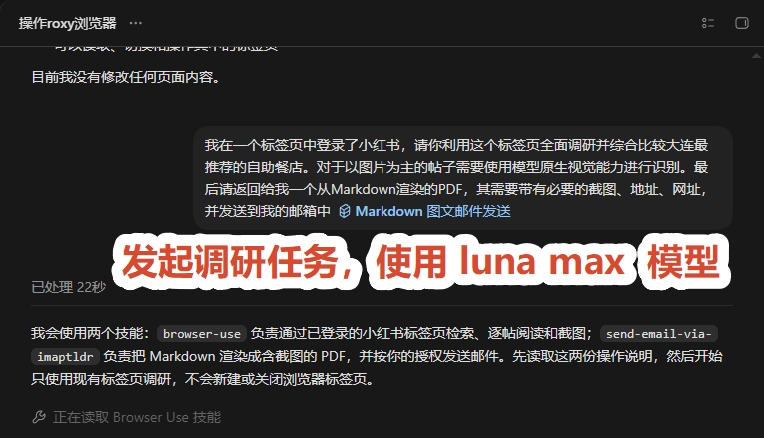
<figure style="margin:10px 0 16px 0;text-align:center;"> [![在已登录的小红书标签页中发起调研任务](https://docs.20020519.xyz/uploads/images/gallery/2026-08/page88-forum-research-start-task.jpg)](https://docs.20020519.xyz/uploads/images/gallery/2026-08/page88-forum-research-start-task.jpg) <figcaption style="text-align:center;color:#57606a;font-size:0.9em;margin-top:6px;">图 12：在已登录的小红书标签页中发起调研任务。</figcaption></figure>```
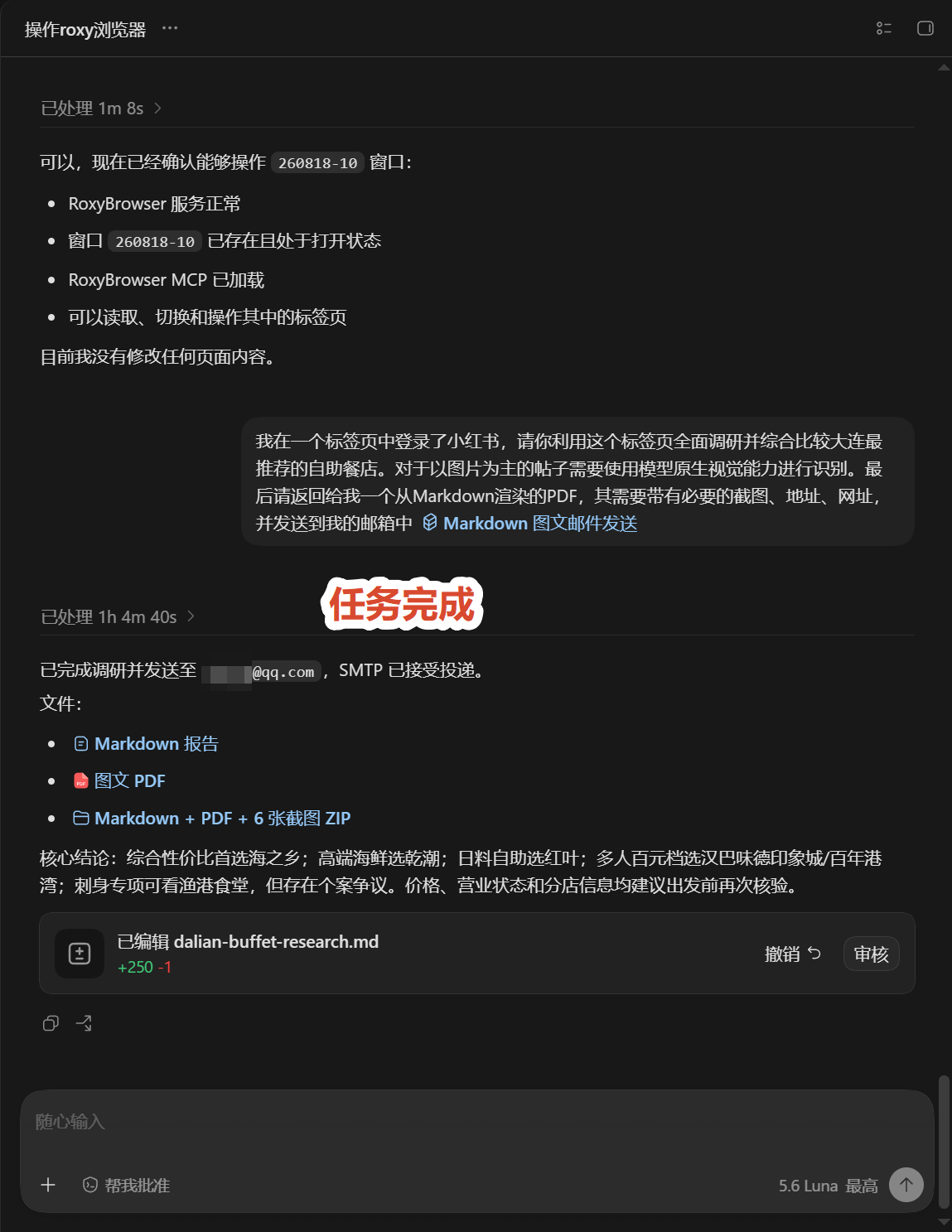
我在一个标签页中登录了小红书，请你利用这个标签页全面调研并综合比较大连最推荐的自助餐店。对于以图片为主的帖子，请使用模型原生视觉能力进行识别。最后请返回一个由 Markdown 渲染的 PDF，包含必要的截图、地址和网址，并发送到我的邮箱中。
```

**能力说明：**提示词中的“发送到我的邮箱”依赖一个自定义的邮件发送 Skill，并不是 Codex App 原生可实现的功能。

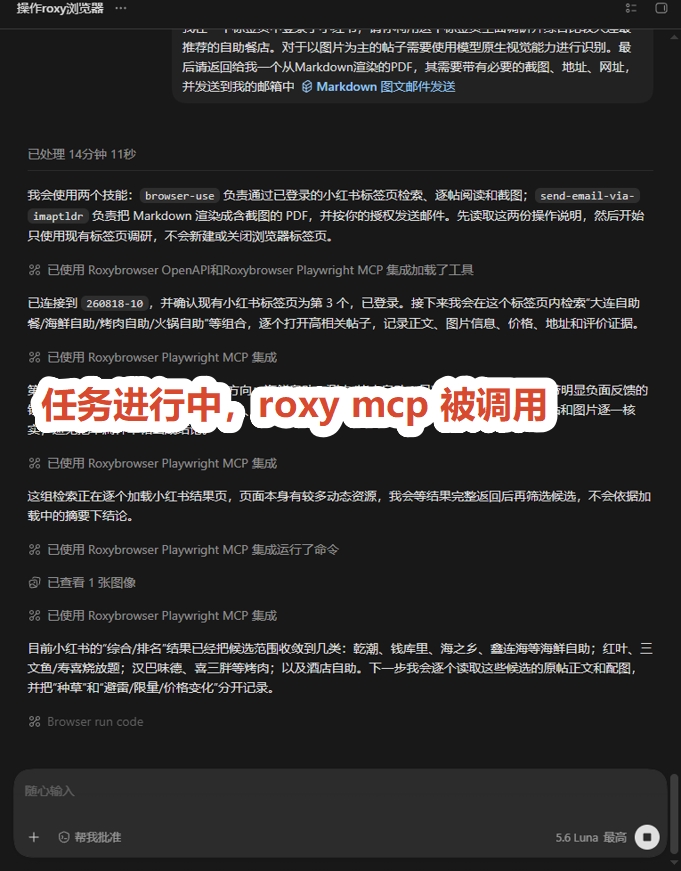
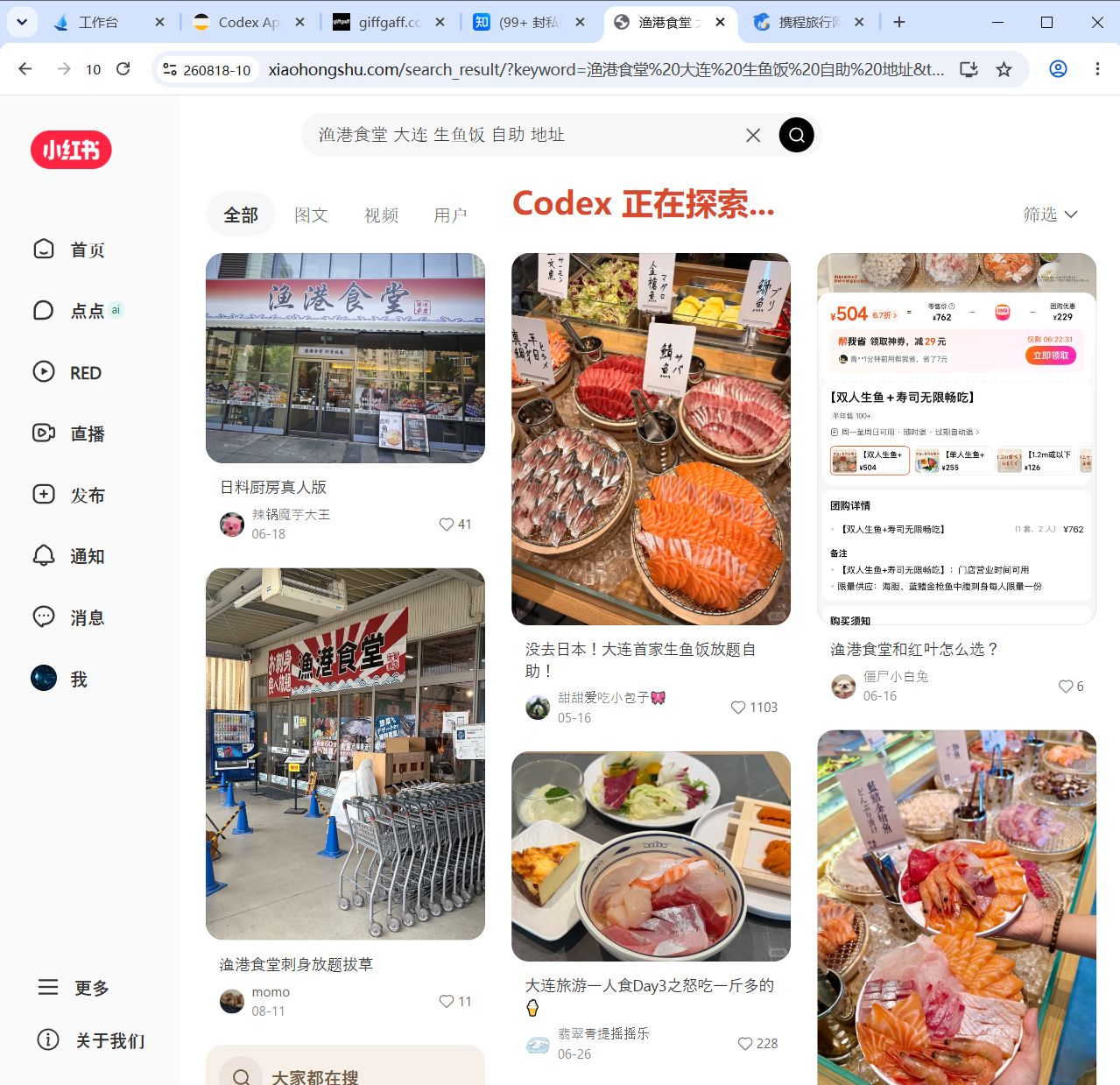
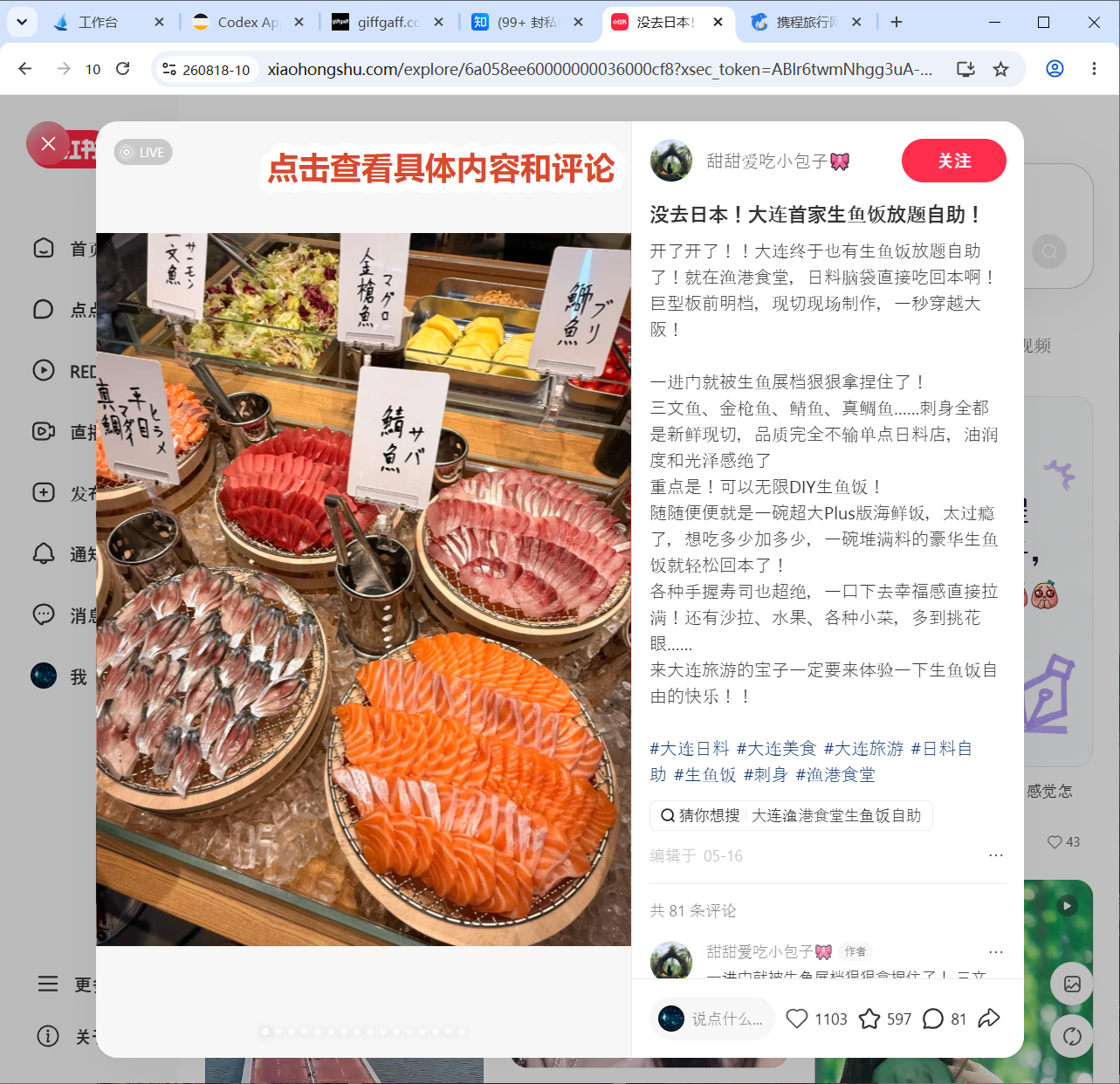
<figure style="margin:10px 0 16px 0;text-align:center;"> [![调研进行中调用 Roxy MCP](https://docs.20020519.xyz/uploads/images/gallery/2026-08/page88-forum-research-roxy-mcp.jpg)](https://docs.20020519.xyz/uploads/images/gallery/2026-08/page88-forum-research-roxy-mcp.jpg) <figcaption style="text-align:center;color:#57606a;font-size:0.9em;margin-top:6px;">图 13：调研进行中，Codex 通过 Roxy MCP 读取小红书标签页。</figcaption></figure><figure style="margin:10px 0 16px 0;text-align:center;"> [![小红书搜索结果页面](https://docs.20020519.xyz/uploads/images/gallery/2026-08/page88-forum-research-xhs-search.png)](https://docs.20020519.xyz/uploads/images/gallery/2026-08/page88-forum-research-xhs-search.png) <figcaption style="text-align:center;color:#57606a;font-size:0.9em;margin-top:6px;">图 14：按关键词读取小红书搜索结果，比较相关性与互动量。</figcaption></figure><figure style="margin:10px 0 16px 0;text-align:center;"> [![查看小红书帖子正文、图片和评论](https://docs.20020519.xyz/uploads/images/gallery/2026-08/page88-forum-research-xhs-post.png)](https://docs.20020519.xyz/uploads/images/gallery/2026-08/page88-forum-research-xhs-post.png) <figcaption style="text-align:center;color:#57606a;font-size:0.9em;margin-top:6px;">图 15：打开候选帖子，读取正文、图片和评论区信息。</figcaption></figure><figure style="margin:10px 0 16px 0;text-align:center;"> [![调研完成并生成 Markdown、PDF 和截图压缩包](https://docs.20020519.xyz/uploads/images/gallery/2026-08/page88-forum-research-complete.png)](https://docs.20020519.xyz/uploads/images/gallery/2026-08/page88-forum-research-complete.png) <figcaption style="text-align:center;color:#57606a;font-size:0.9em;margin-top:6px;">图 16：完成调研并生成 Markdown、PDF 和截图压缩包。</figcaption></figure>**文件下载：**

- [图文 PDF：dalian-buffet-research.pdf](https://files.20020519.xyz/api/public/dl/RvdvxJWv?inline=true)
- [Markdown 源文件：dalian-buffet-research.md](https://files.20020519.xyz/api/public/dl/8BS0kYzy?inline=true)

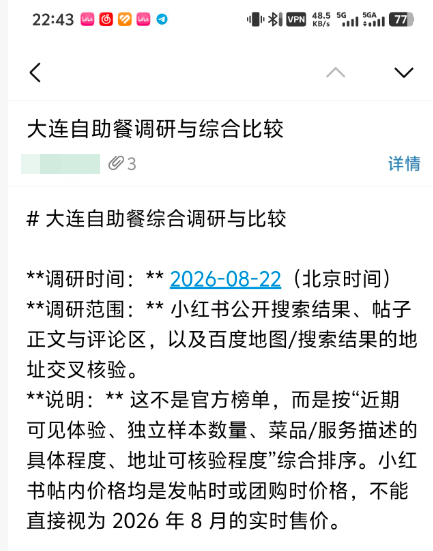
<figure style="margin:10px 0 16px 0;text-align:center;"> [![移动端查看最终调研报告](https://docs.20020519.xyz/uploads/images/gallery/2026-08/page88-forum-research-report.png)](https://docs.20020519.xyz/uploads/images/gallery/2026-08/page88-forum-research-report.png) <figcaption style="text-align:center;color:#57606a;font-size:0.9em;margin-top:6px;">图 17：移动端查看最终调研报告，报告包含调研时间、范围和说明。</figcaption></figure></details><details id="bkmrk-%E7%82%B9%E5%87%BB%E5%B1%95%E5%BC%80%EF%BC%9A%E6%96%87%E7%8C%AE%E6%A3%80%E7%B4%A2%E4%B8%8E%E4%B8%8B%E8%BD%BD%E5%AE%9E%E6%93%8D-%E5%9C%A8%E5%B8%B8%E7%94%A8%E6%9C%9F%E5%88%8A"><summary>点击展开：文献检索与下载实操</summary>

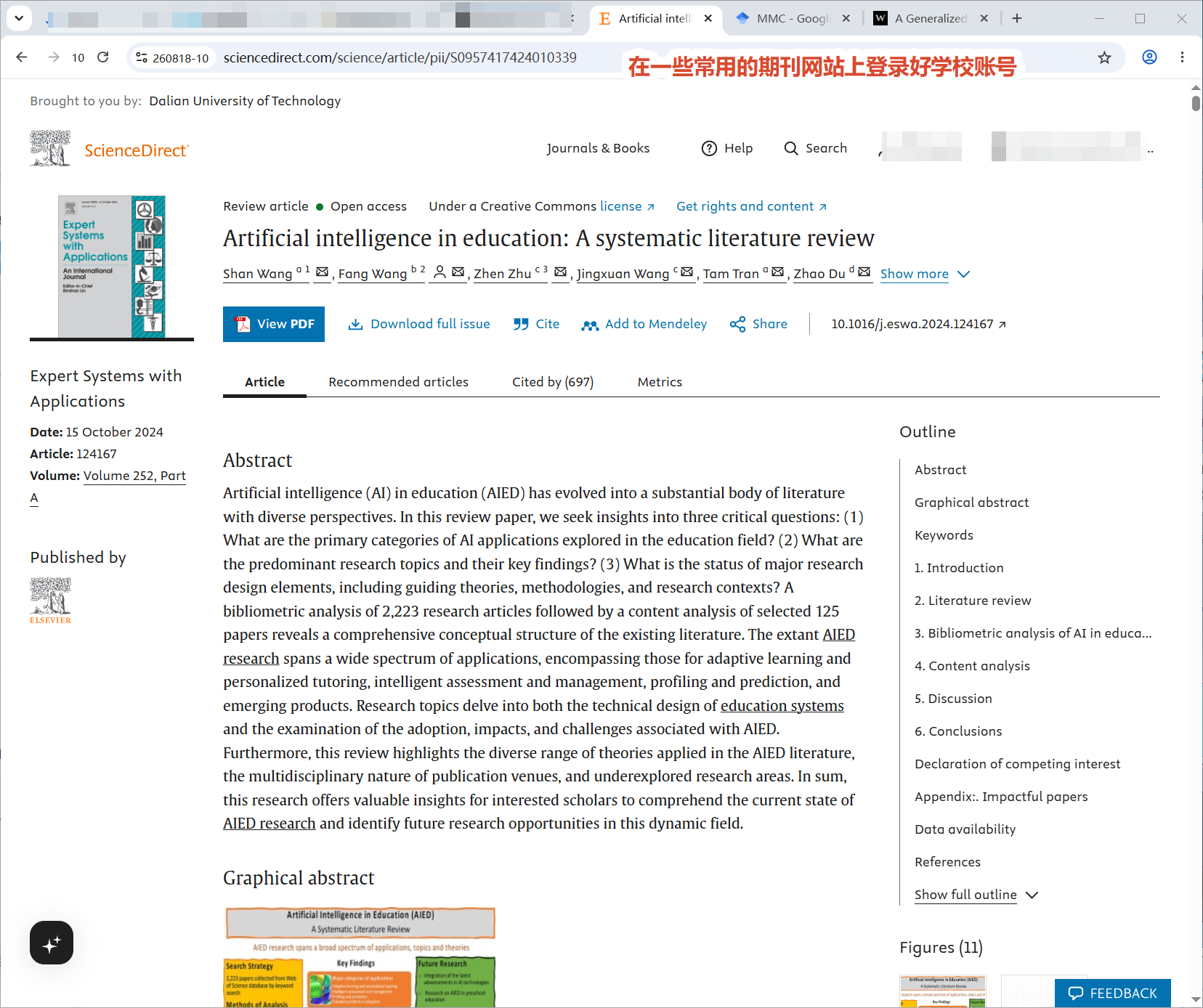
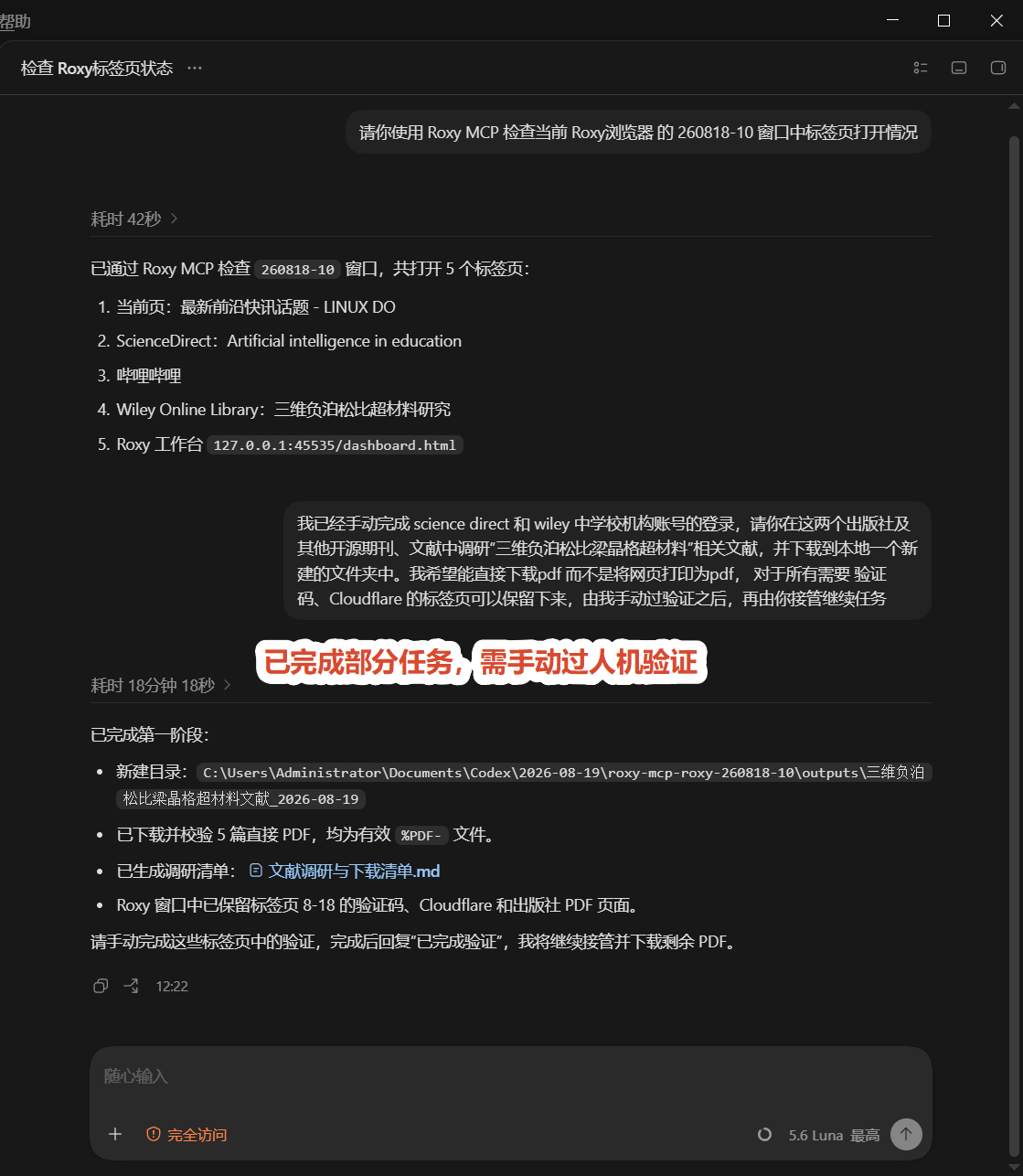
在常用期刊网站完成学校机构账号登录后，将相应的 Roxy 窗口交给 Codex；它可读取学术站点、检索并下载可直接访问的 PDF，同时整理清单。

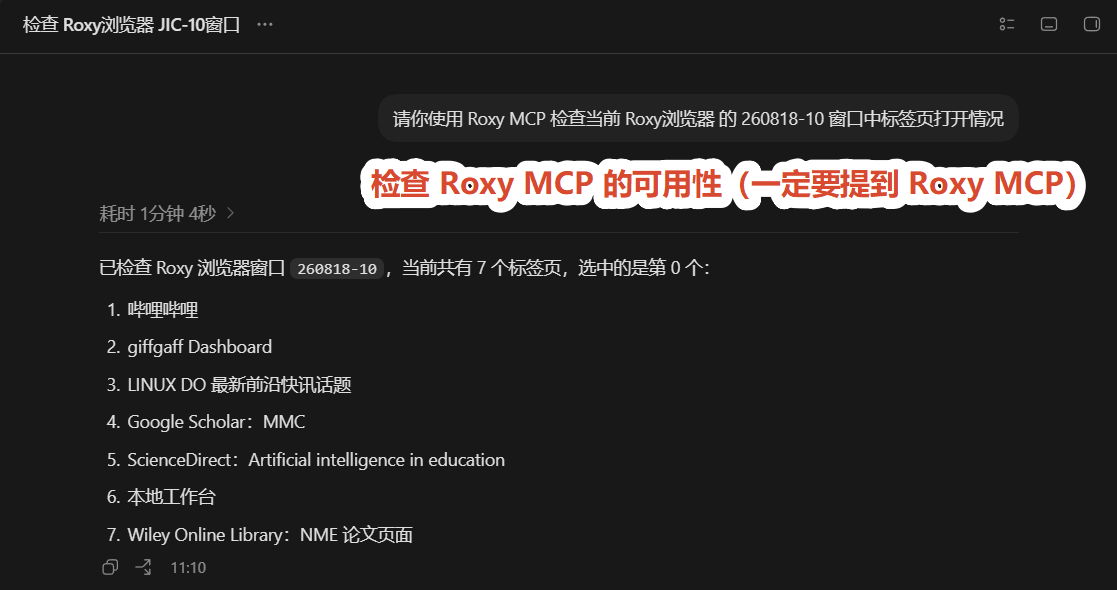
<figure style="margin: 10px 0 16px 0; text-align: center;"> [![在常用期刊网站完成学校机构账号登录](https://docs.20020519.xyz/uploads/images/gallery/2026-08/page88-literature-institutional-access-20260819.png)](https://docs.20020519.xyz/uploads/images/gallery/2026-08/page88-literature-institutional-access-20260819.png) <figcaption style="text-align: center; color: #57606a; font-size: 0.9em; margin-top: 6px;">图 7：在常用期刊网站完成学校机构账号登录。</figcaption></figure><figure style="margin: 10px 0 16px 0; text-align: center;"> [![Codex 通过 Roxy MCP 读取共享窗口中的期刊站点标签页](https://docs.20020519.xyz/uploads/images/gallery/2026-08/page88-literature-roxy-tab-inspection-20260819.png)](https://docs.20020519.xyz/uploads/images/gallery/2026-08/page88-literature-roxy-tab-inspection-20260819.png) <figcaption style="text-align: center; color: #57606a; font-size: 0.9em; margin-top: 6px;">图 8：Codex 通过 Roxy MCP 读取共享窗口中的期刊站点标签页。</figcaption></figure>```
请你使用 Roxy MCP 检查当前 Roxy浏览器的 260818-10 窗口中标签页打开情况
```

<figure style="margin: 10px 0 16px 0; text-align: center;"> [![直接可访问的 PDF 已下载，验证页面留给用户手动接管](https://docs.20020519.xyz/uploads/images/gallery/2026-08/page88-literature-verification-handoff-20260819.png)](https://docs.20020519.xyz/uploads/images/gallery/2026-08/page88-literature-verification-handoff-20260819.png) <figcaption style="text-align: center; color: #57606a; font-size: 0.9em; margin-top: 6px;">图 9：直接可访问的 PDF 已下载；验证页面保留给用户手动接管。</figcaption></figure>```
我已经手动完成 science direct 和 wiley 中学校机构账号的登录，请你在这两个出版社及其他开源期刊、文献中调研“三维负泊松比梁晶格超材料”相关文献，并下载到本地一个新建的文件夹中。我希望能直接下载pdf而不是将网页打印为pdf，对于所有需要验证码、Cloudflare 的标签页可以保留下来，由我手动过验证之后，再由你接管继续任务
```

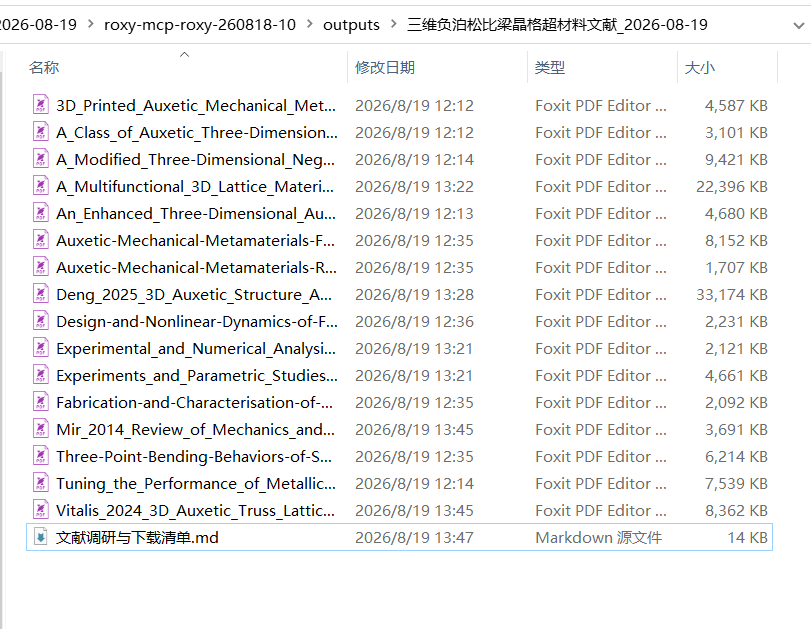
<figure style="margin: 10px 0 16px 0; text-align: center;"> [![下载的 PDF 与文献调研清单已整理到本地输出目录](https://docs.20020519.xyz/uploads/images/gallery/2026-08/page88-literature-output-folder-20260819.png)](https://docs.20020519.xyz/uploads/images/gallery/2026-08/page88-literature-output-folder-20260819.png) <figcaption style="text-align: center; color: #57606a; font-size: 0.9em; margin-top: 6px;">图 10：下载的 PDF 与文献调研清单已整理到本地输出目录。</figcaption></figure>**验证边界：**下载全文仍可能触发验证码或 Cloudflare。Codex 不会绕过验证码、Cloudflare 或其他安全验证；遇到时保留页面，由你手动完成验证，之后再交回继续。检索、筛选、题录整理、清单汇总等通常不会弹出人机验证的任务更适合交给它处理。

</details>#### 内容平台与网站事务

- **B 站：**读取收藏夹、稍后再看或搜索结果，按账号、关键词、时间范围和视频类型筛选；在明确范围内批量点赞、收藏或整理清单。
- **订票比价：**按出发地、目的地、日期和人数查询多个方案，对比总价、时间、退改签规则及行李/服务费，整理候选方案；下单、支付前再确认。
- **退款申请：**读取订单和平台规则，核对可退条件、退款金额与所需材料，起草申请文案、填写工单并跟踪进度；提交前再确认。
- **订单、工单与账单：**查找相关记录，汇总当前状态、关键日期和下一步。

<details id="bkmrk-%E7%82%B9%E5%87%BB%E5%B1%95%E5%BC%80%EF%BC%9A%E8%AE%A2%E7%A5%A8%E6%AF%94%E4%BB%B7%E5%AE%9E%E6%93%8D-%E4%B8%8B%E9%9D%A2%E4%BB%A5%E6%90%BA%E7%A8%8B%E6%97%85%E8%A1%8C%E5%AE%98"><summary>点击展开：订票比价实操</summary>

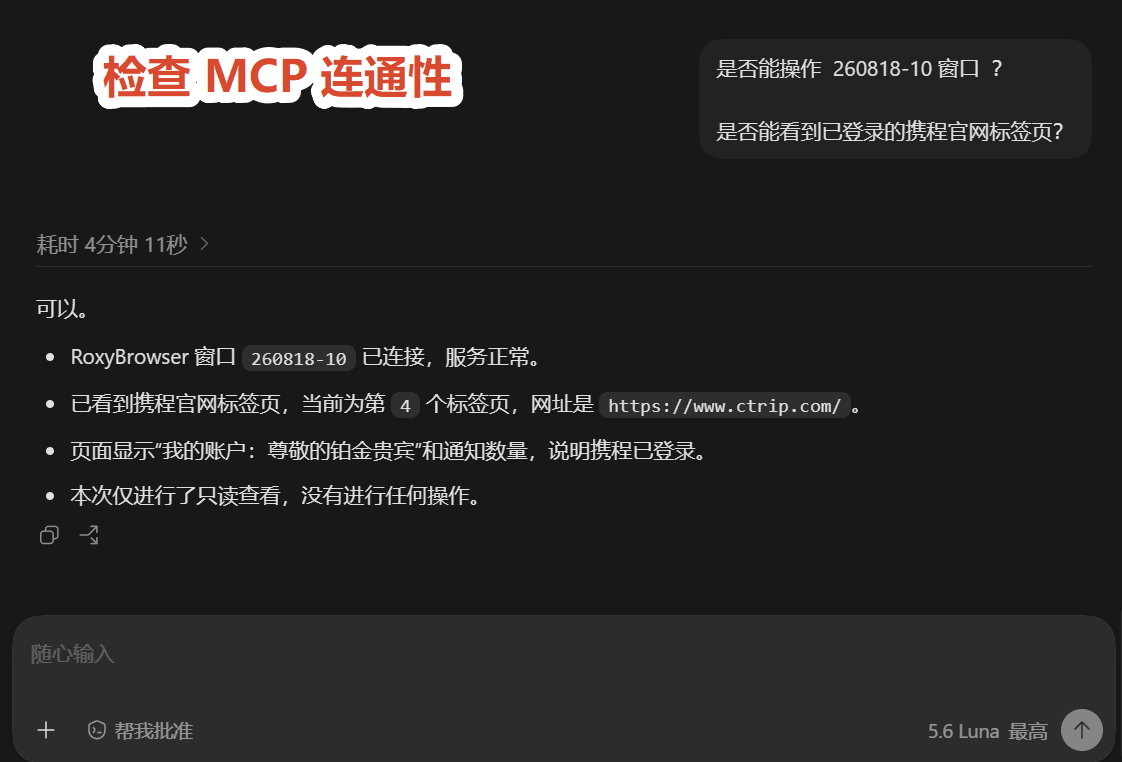
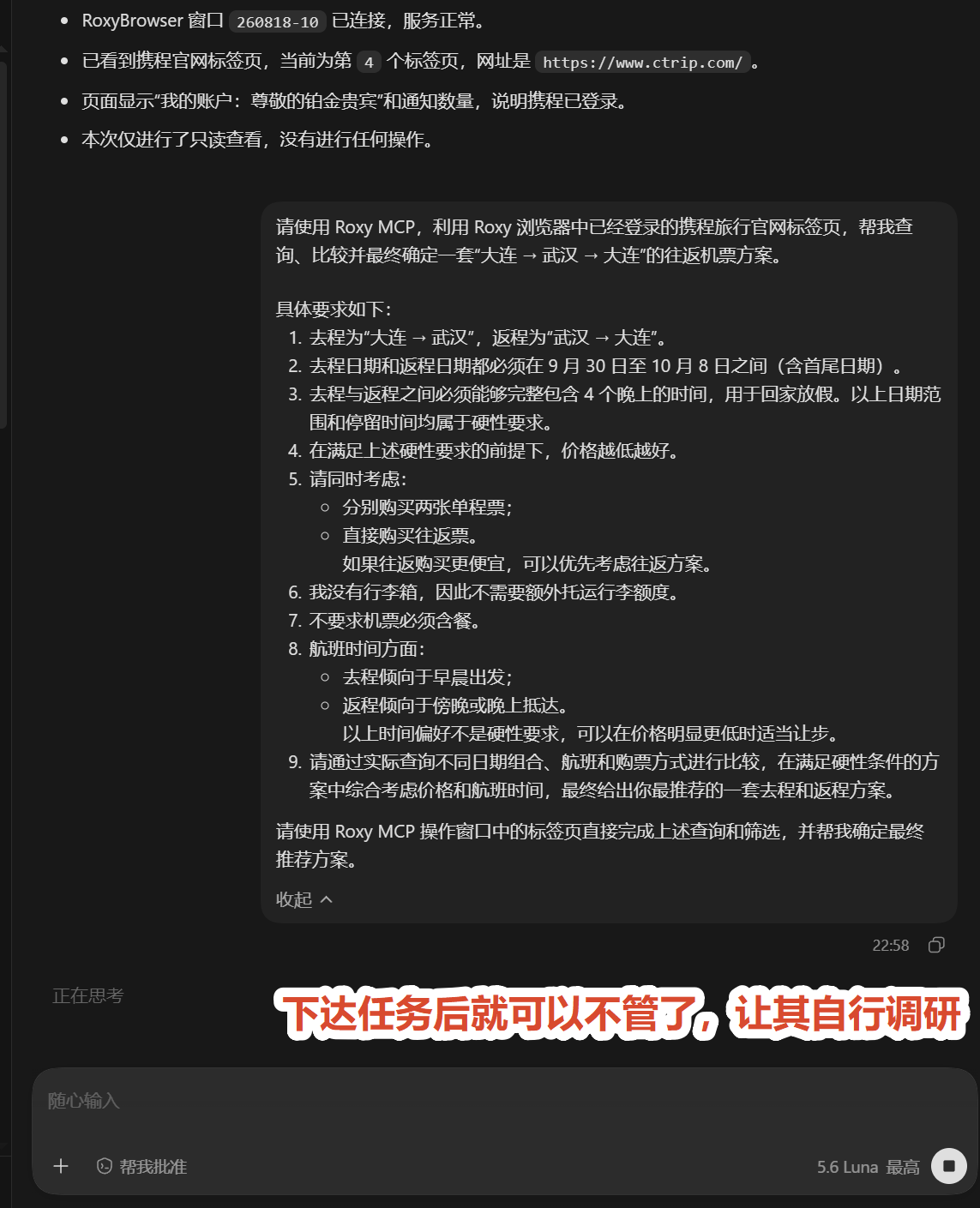
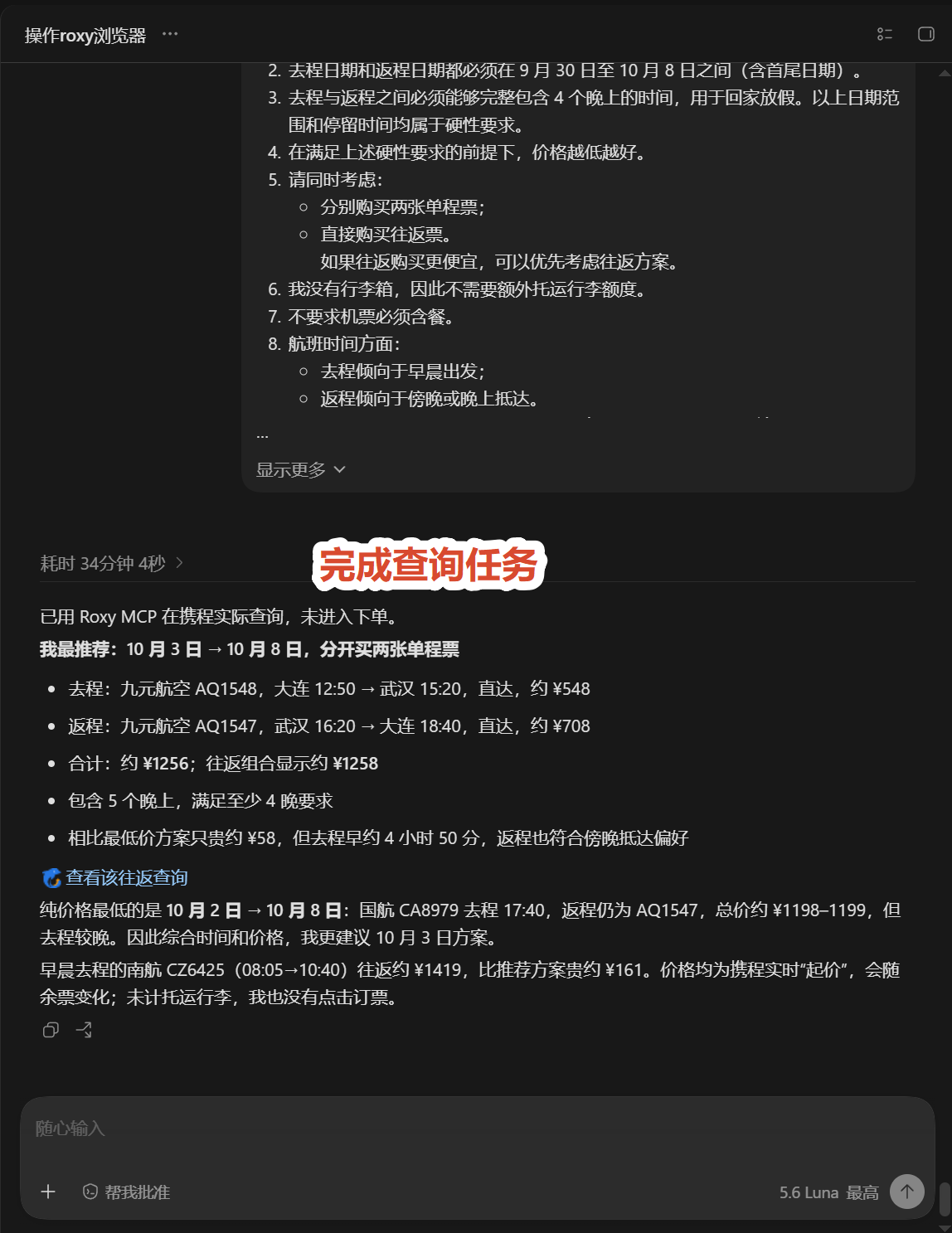
下面以携程旅行官网的实际查询为例，展示如何把路线、日期、停留时间等硬性条件写清楚，再让 Codex 查询不同日期组合、航班和购票方式并整理推荐方案。查询和比较可以交给 Codex；进入下单、支付或提交前，再由你确认。

<figure style="margin:10px 0 16px 0;text-align:center;"> [![检查 Roxy MCP 连通性和已登录携程标签页](https://docs.20020519.xyz/uploads/images/gallery/2026-08/page88-ticket-research-mcp-check.png)](https://docs.20020519.xyz/uploads/images/gallery/2026-08/page88-ticket-research-mcp-check.png) <figcaption style="text-align:center;color:#57606a;font-size:0.9em;margin-top:6px;">图 18：检查 Roxy MCP 连通性和已登录的携程官网标签页。</figcaption></figure>```
是否能操作 260818-10 窗口？
是否能看到已登录的携程官网标签页？
```

<figure style="margin:10px 0 16px 0;text-align:center;"> [![发起携程往返机票查询任务](https://docs.20020519.xyz/uploads/images/gallery/2026-08/page88-ticket-research-prompt.png)](https://docs.20020519.xyz/uploads/images/gallery/2026-08/page88-ticket-research-prompt.png) <figcaption style="text-align:center;color:#57606a;font-size:0.9em;margin-top:6px;">图 19：发起携程往返机票查询，明确硬性条件和时间偏好。</figcaption></figure>```
请使用 Roxy MCP，利用 Roxy 浏览器中已经登录的携程旅行官网标签页，帮我查询、比较并最终确定一套“大连 → 武汉 → 大连”的往返机票方案。

具体要求如下：

1. 去程为“大连 → 武汉”，返程为“武汉 → 大连”。
2. 去程日期和返程日期都必须在 9 月 30 日至 10 月 8 日之间（含首尾日期）。
3. 去程与返程之间必须能够完整包含 4 个晚上的时间，用于回家放假。以上日期范围和停留时间均属于硬性要求。
4. 在满足上述硬性要求的前提下，价格越低越好。
5. 请同时考虑：
   - 分别购买两张单程票；
   - 直接购买往返票。
     如果往返购买更便宜，可以优先考虑往返方案。
6. 我没有行李箱，因此不需要额外托运行李额度。
7. 不要求机票必须含餐。
8. 航班时间方面：
   - 去程倾向于早晨出发；
   - 返程倾向于傍晚或晚上抵达。
     以上时间偏好不是硬性要求，可以在价格明显更低时适当让步。
9. 请通过实际查询不同日期组合、航班和购票方式进行比较，在满足硬性条件的方案中综合考虑价格和航班时间，最终给出你最推荐的一套去程和返程方案。

请使用 Roxy MCP 操作窗口中的标签页直接完成上述查询和筛选，并帮我确定最终推荐方案。
```

<figure style="margin:10px 0 16px 0;text-align:center;"> [![携程查询完成并输出推荐方案](https://docs.20020519.xyz/uploads/images/gallery/2026-08/page88-ticket-research-result.png)](https://docs.20020519.xyz/uploads/images/gallery/2026-08/page88-ticket-research-result.png) <figcaption style="text-align:center;color:#57606a;font-size:0.9em;margin-top:6px;">图 20：查询完成，输出推荐航班方案，并明确未进入下单流程。</figcaption></figure>**截图中的结果示例：**一次查询推荐了 10 月 3 日去程、10 月 8 日返程，满足 5 个晚上的停留要求；截图中的航班、价格和余票会随时间变化，不能直接视为当前报价。

</details><details id="bkmrk-%E7%82%B9%E5%87%BB%E5%B1%95%E5%BC%80%EF%BC%9A%E5%9C%A8%E7%BA%BF%E6%95%B0%E7%8B%AC%E5%AE%9E%E6%93%8D-%E8%BF%99%E6%98%AF%E4%B8%80%E4%B8%AA%E8%BD%BB%E9%87%8F%E3%80%81%E7%BB%93"><summary>点击展开：在线数独实操</summary>

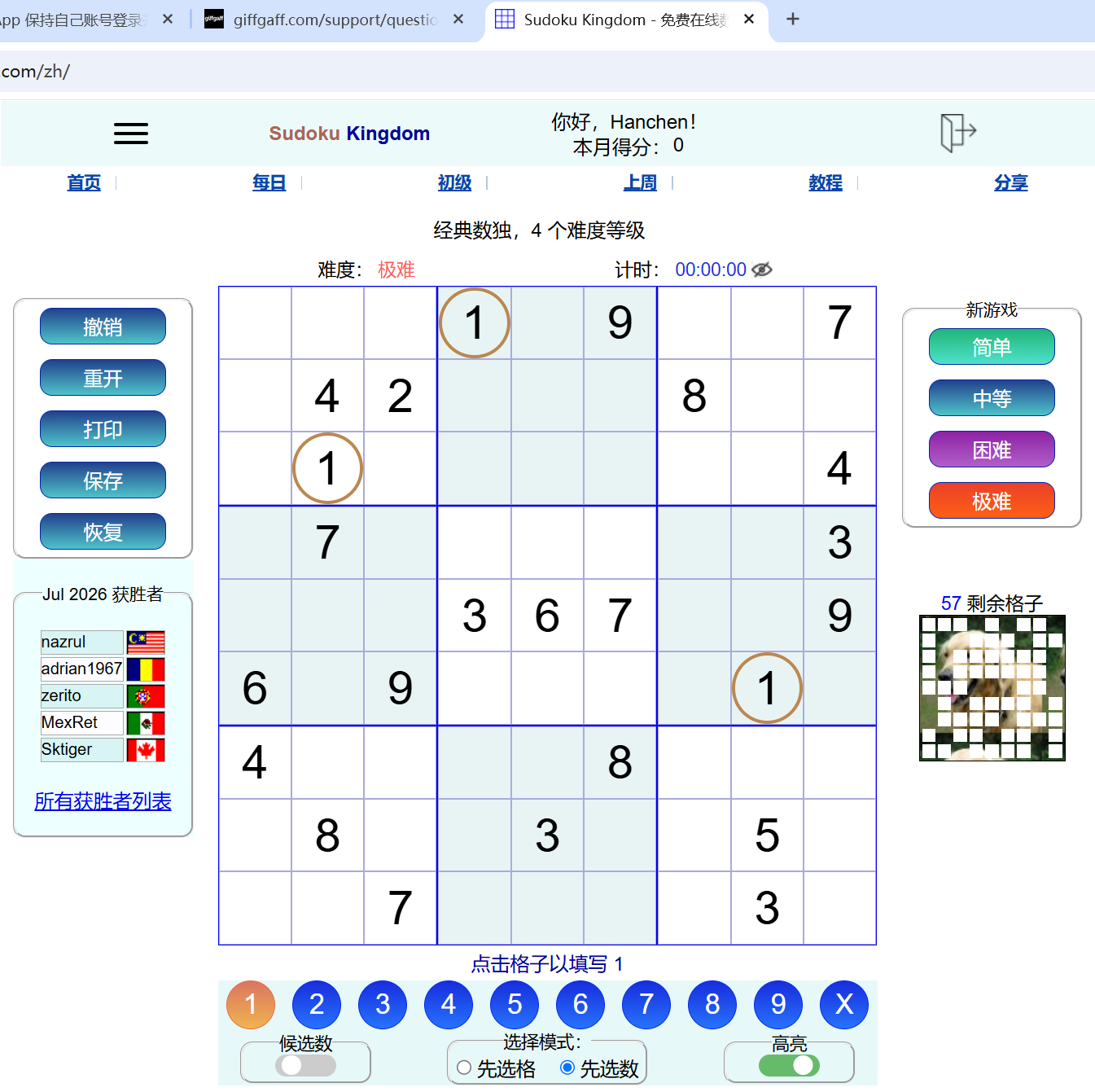
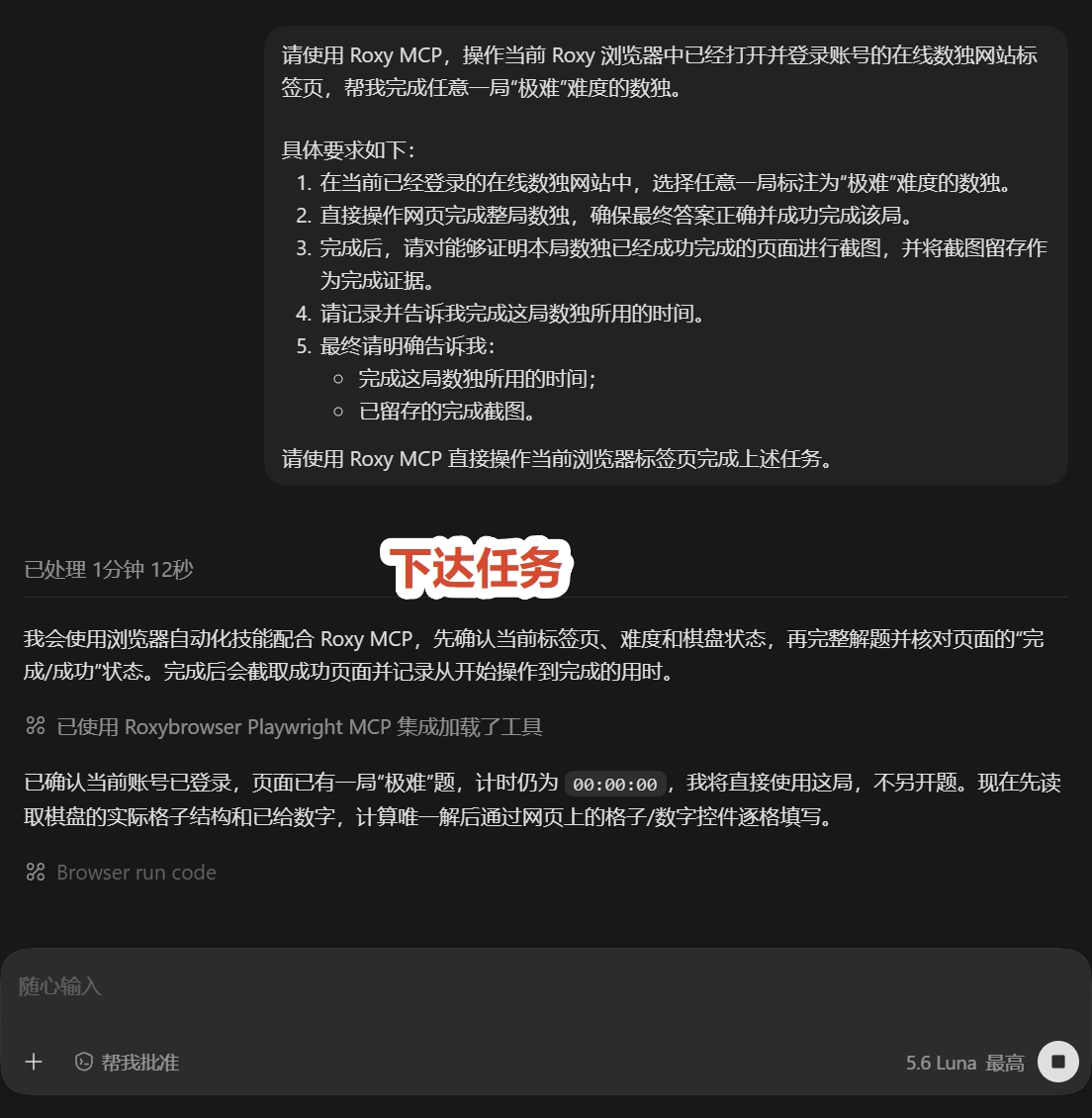
这是一个轻量、结果容易核验的网页操作案例：让 Codex 通过 Roxy MCP，在在线数独标签页中完成一局“极难”难度的数独。提示词同时写清了任务目标、完成标准、截图留痕和耗时记录。

<figure style="margin:10px 0 16px 0;text-align:center;"> [![在线数独极难题目页面](https://docs.20020519.xyz/uploads/images/gallery/2026-08/page88-sudoku-board-before.png)](https://docs.20020519.xyz/uploads/images/gallery/2026-08/page88-sudoku-board-before.png) <figcaption style="text-align:center;color:#57606a;font-size:0.9em;margin-top:6px;">图 21：在线数独页面，当前选择为“极难”难度。</figcaption></figure>先确认目标页面和难度，再把操作范围、成功条件及结果留痕要求一次写清楚：

<figure style="margin:10px 0 16px 0;text-align:center;"> [![在 Codex 中提交在线数独任务](https://docs.20020519.xyz/uploads/images/gallery/2026-08/page88-sudoku-task-prompt.jpg)](https://docs.20020519.xyz/uploads/images/gallery/2026-08/page88-sudoku-task-prompt.jpg) <figcaption style="text-align:center;color:#57606a;font-size:0.9em;margin-top:6px;">图 22：在 Codex 中提交明确的数独操作任务。</figcaption></figure>```
请使用 Roxy MCP，操作当前 Roxy 浏览器中已经打开并登录账号的在线数独网站标签页，帮我完成任意一局“极难”难度的数独。

具体要求如下：

1. 在当前已经登录的在线数独网站中，选择任意一局标注为“极难”难度的数独。
2. 直接操作网页完成整局数独，确保最终答案正确并成功完成该局。
3. 完成后，请对能够证明本局数独已经成功完成的页面进行截图，并将截图留存作为完成证据。
4. 请记录并告诉我完成这局数独所用的时间。
5. 最终请明确告诉我：
   - 完成这局数独所用的时间；
   - 已留存的完成截图。

请使用 Roxy MCP 直接操作当前浏览器标签页完成上述任务。
```

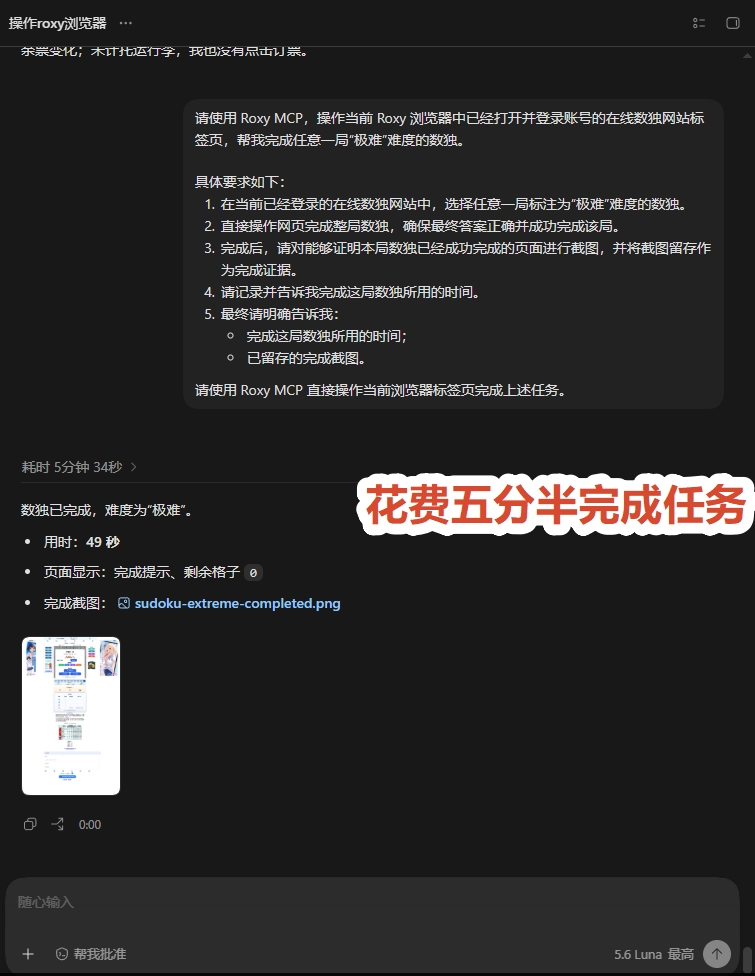
任务执行过程中，Codex 读取棋盘并完成填写，结束后返回页面状态、耗时和截图证据：

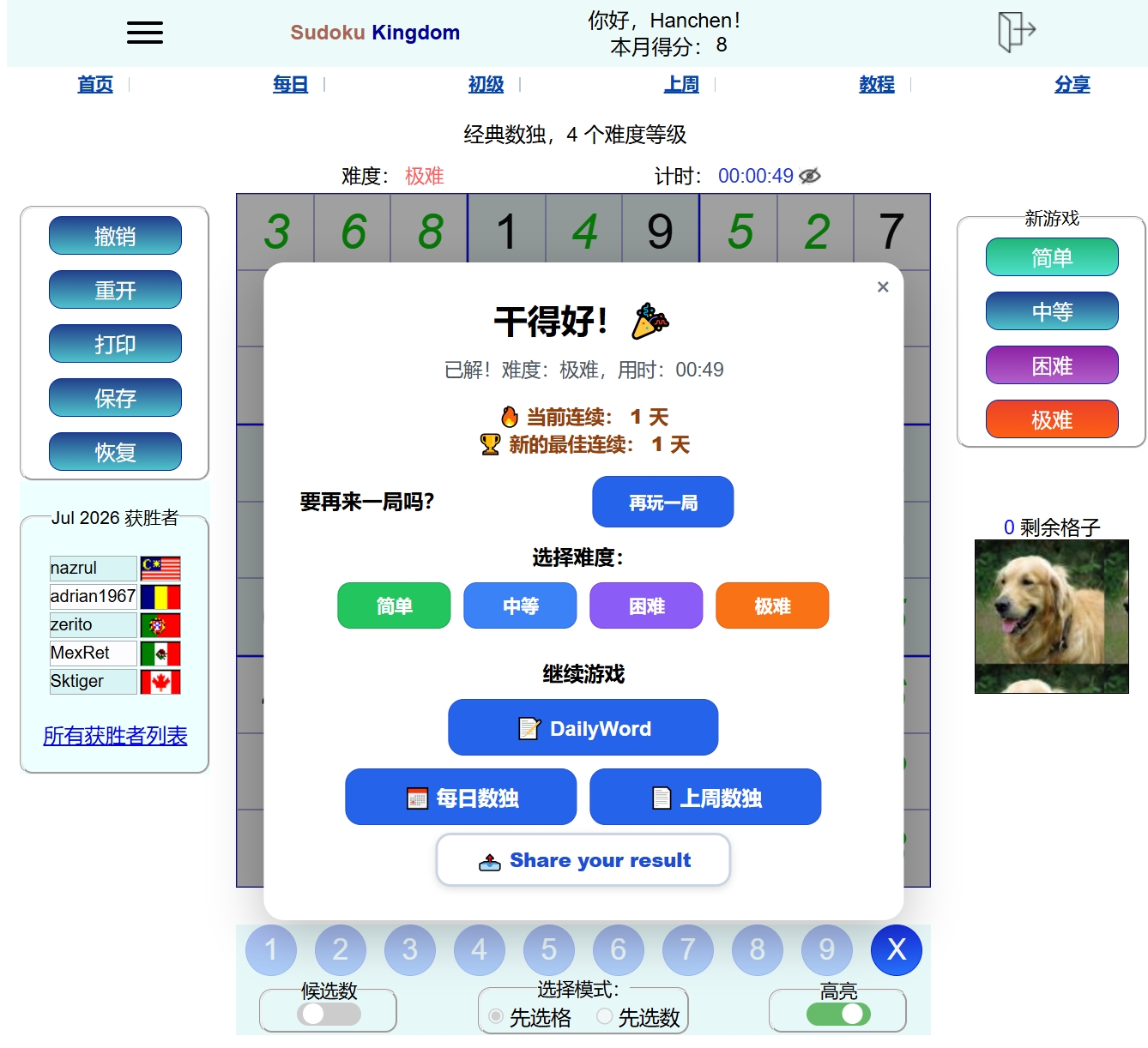
<figure style="margin:10px 0 16px 0;text-align:center;"> [![Codex 返回数独完成结果](https://docs.20020519.xyz/uploads/images/gallery/2026-08/page88-sudoku-codex-result.jpg)](https://docs.20020519.xyz/uploads/images/gallery/2026-08/page88-sudoku-codex-result.jpg) <figcaption style="text-align:center;color:#57606a;font-size:0.9em;margin-top:6px;">图 23：Codex 返回已完成状态、耗时和完成截图。</figcaption></figure>网页端弹出成功提示，说明答案已通过校验：

<figure style="margin:10px 0 16px 0;text-align:center;"> [![在线数独完成成功提示](https://docs.20020519.xyz/uploads/images/gallery/2026-08/page88-sudoku-complete-dialog.jpg)](https://docs.20020519.xyz/uploads/images/gallery/2026-08/page88-sudoku-complete-dialog.jpg) <figcaption style="text-align:center;color:#57606a;font-size:0.9em;margin-top:6px;">图 24：网页显示“干得好”，极难数独完成，用时 00:49。</figcaption></figure>**案例要点：**这类任务的目标明确、操作范围有限、结果可以在网页上直接核验，适合交给 Codex 协作完成；同时要求截图和耗时记录，便于复查任务是否真正完成。

</details>#### 邮箱与沟通

- **邮箱：**按发件人、主题和时间筛选邮件，提炼重点，生成待办、回复草稿或分类清单；发送、删除前再确认。
- **通知与私信：**筛出需要处理的消息，按待回复、待跟进、仅知悉分类，列出来源、截止时间和下一步。

<details id="bkmrk-%E7%82%B9%E5%87%BB%E5%B1%95%E5%BC%80%EF%BC%9A%E9%82%AE%E7%AE%B1%E6%95%B4%E7%90%86%E4%B8%8E%E8%AE%BA%E6%96%87%E7%AD%9B%E9%80%89%E5%AE%9E%E6%93%8D-%E8%BF%99%E4%B8%AA%E6%A1%88"><summary>点击展开：邮箱整理与论文筛选实操</summary>

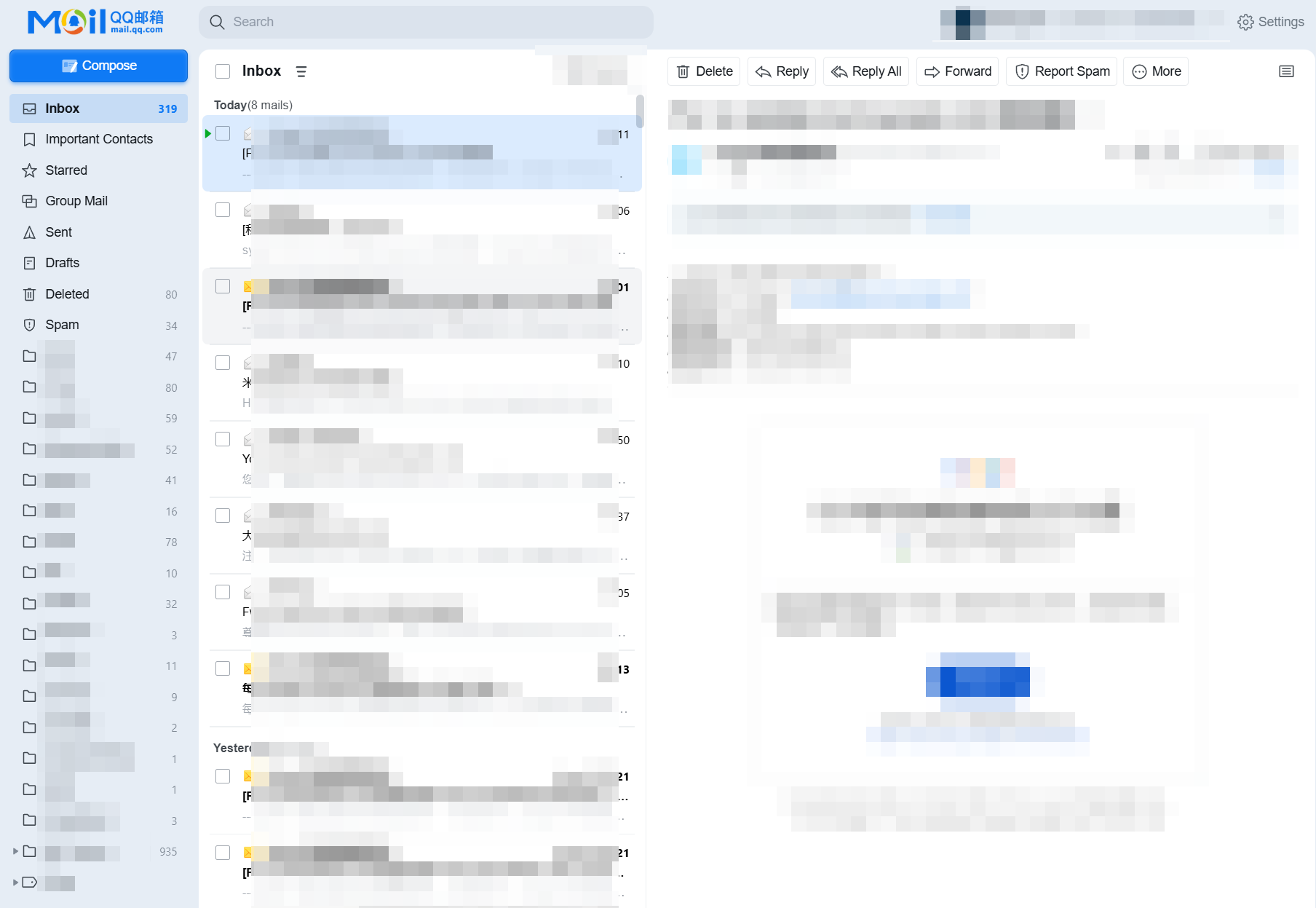
这个案例展示了一个典型的人机协作流程：用户先登录 QQ 邮箱、ScienceDirect、Google Scholar 和 Wiley Online Library，Codex 再通过 Roxy MCP 读取邮件并整理未读内容，同时按研究方向筛选论文。遇到 CAPTCHA、人机验证或需要确认的动作时，应停下交由用户处理。

<figure style="margin:10px 0 16px 0;text-align:center;"> [![已登录 QQ 邮箱页面](https://docs.20020519.xyz/uploads/images/gallery/2026-08/page88-email-research-inbox-20260823.png)](https://docs.20020519.xyz/uploads/images/gallery/2026-08/page88-email-research-inbox-20260823.png) <figcaption style="text-align:center;color:#57606a;font-size:0.9em;margin-top:6px;">图 25：已登录 QQ 邮箱，准备读取邮件并整理未读内容。</figcaption></figure>先检查 Roxy MCP 是否能读取当前窗口和已登录的邮箱、学术网站标签页：

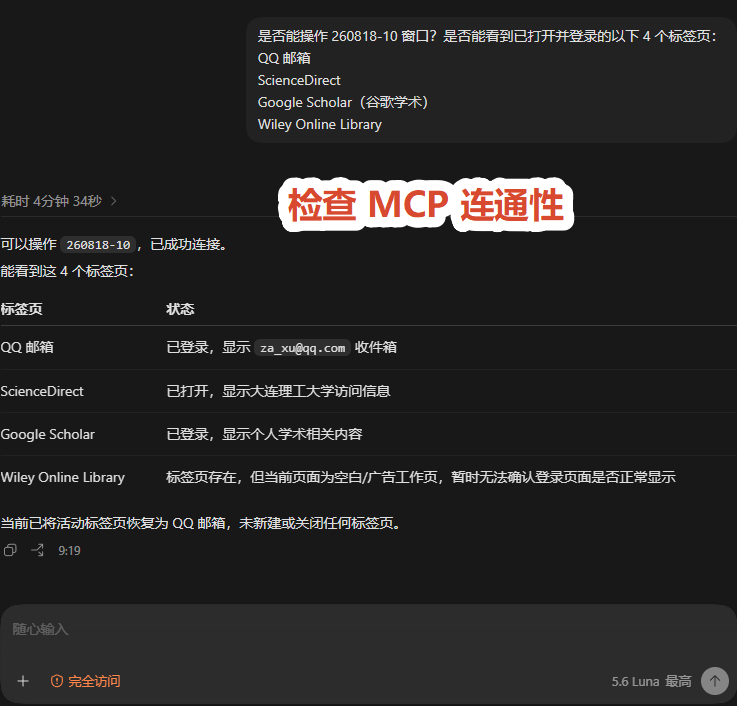
<figure style="margin:10px 0 16px 0;text-align:center;"> [![检查 Roxy MCP 与邮箱和学术网站标签页的连通性](https://docs.20020519.xyz/uploads/images/gallery/2026-08/page88-email-research-mcp-check-20260823.png)](https://docs.20020519.xyz/uploads/images/gallery/2026-08/page88-email-research-mcp-check-20260823.png) <figcaption style="text-align:center;color:#57606a;font-size:0.9em;margin-top:6px;">图 26：检查 Roxy MCP 是否能读取 260818-10 窗口中的 4 个标签页。</figcaption></figure>```
是否能操作 260818-10 窗口？是否能看到已打开并登录的以下 4 个标签页：
QQ 邮箱
ScienceDirect
Google Scholar（谷歌学术）
Wiley Online Library
```

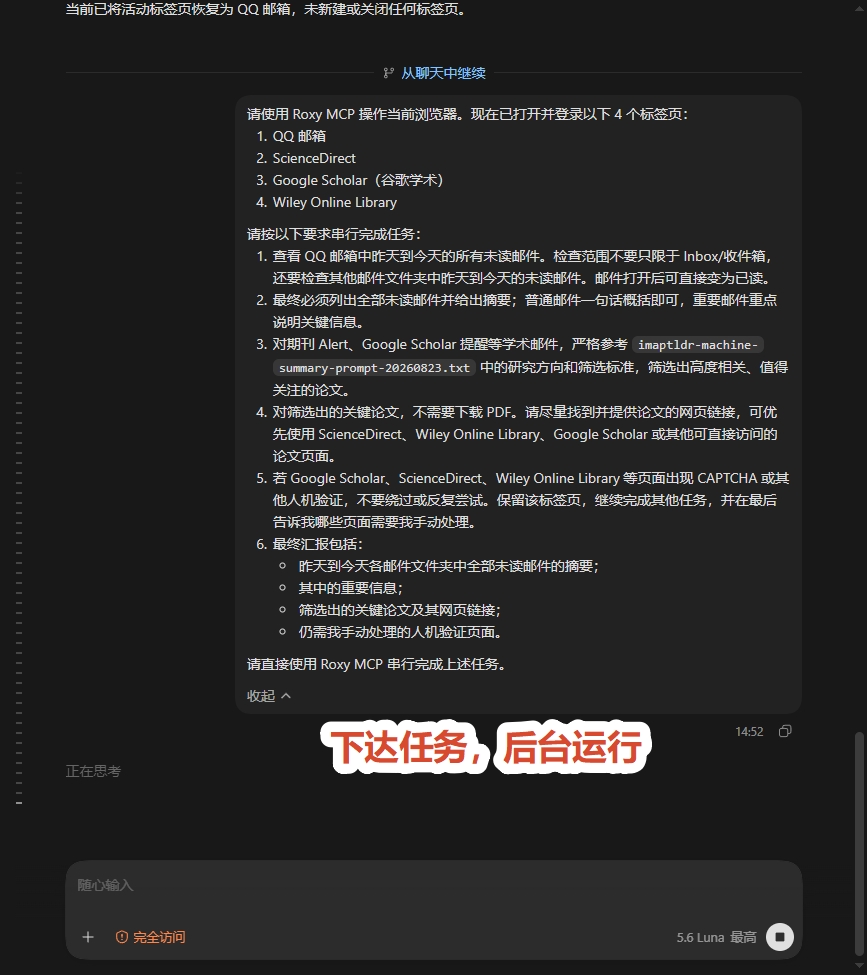
连接确认后，再提交邮箱整理、论文筛选和人机验证处理要求：

<figure style="margin:10px 0 16px 0;text-align:center;"> [![提交邮箱整理与论文筛选任务](https://docs.20020519.xyz/uploads/images/gallery/2026-08/page88-email-research-task-prompt-20260823.jpg)](https://docs.20020519.xyz/uploads/images/gallery/2026-08/page88-email-research-task-prompt-20260823.jpg) <figcaption style="text-align:center;color:#57606a;font-size:0.9em;margin-top:6px;">图 27：提交邮箱整理和研究方向论文筛选任务。</figcaption></figure>```
请使用 Roxy MCP 操作当前浏览器。现在已打开并登录以下 4 个标签页：
1. QQ 邮箱
2. ScienceDirect
3. Google Scholar（谷歌学术）
4. Wiley Online Library

请按以下要求串行完成任务：
1. 查看 QQ 邮箱中昨天到今天的所有未读邮件。检查范围不要只限于 Inbox/收件箱，还要检查其他邮件文件夹，以及邮件打开后可能存在的未读邮件。邮件打开后直接变为已读。
2. 最终必须列出全部未读邮件并给出摘要；普通邮件一句话概括即可，重要邮件重点说明关键信息。
3. 对期刊 Alert、Google Scholar 提醒等学术邮件，严格参考 imaptldr-machine-summary-prompt-20260823.txt 中的研究方向和筛选标准，筛选出高度相关、值得关注的论文。
4. 对筛选出的关键论文，不需要下载 PDF，请尽量找到并提供论文的网页链接，可优先使用 ScienceDirect、Wiley Online Library、Google Scholar 或其他可直接访问的论文页面。
5. 若 Google Scholar、ScienceDirect、Wiley Online Library 等页面出现 CAPTCHA 或其他人机验证，不要绕过或反复尝试。保留该标签页，继续完成其他低风险任务，并在最后告诉我哪些页面需要我手动处理。
6. 最终汇总包括：
   - 昨天到今天各邮件文件夹中全部未读邮件的摘要；
   - 其中的重要信息；
   - 筛选出的关键论文及其网页链接；
   - 仍需我手动处理的人机验证页面。

请直接使用 Roxy MCP 串行完成上述任务。
```

**研究方向筛选提示词：**[查看或下载研究方向筛选标准（TXT）](https://files.20020519.xyz/api/public/dl/7gf844Zn?inline=true)。该文件用于期刊 Alert、Google Scholar 提醒等学术邮件的论文相关性筛选。

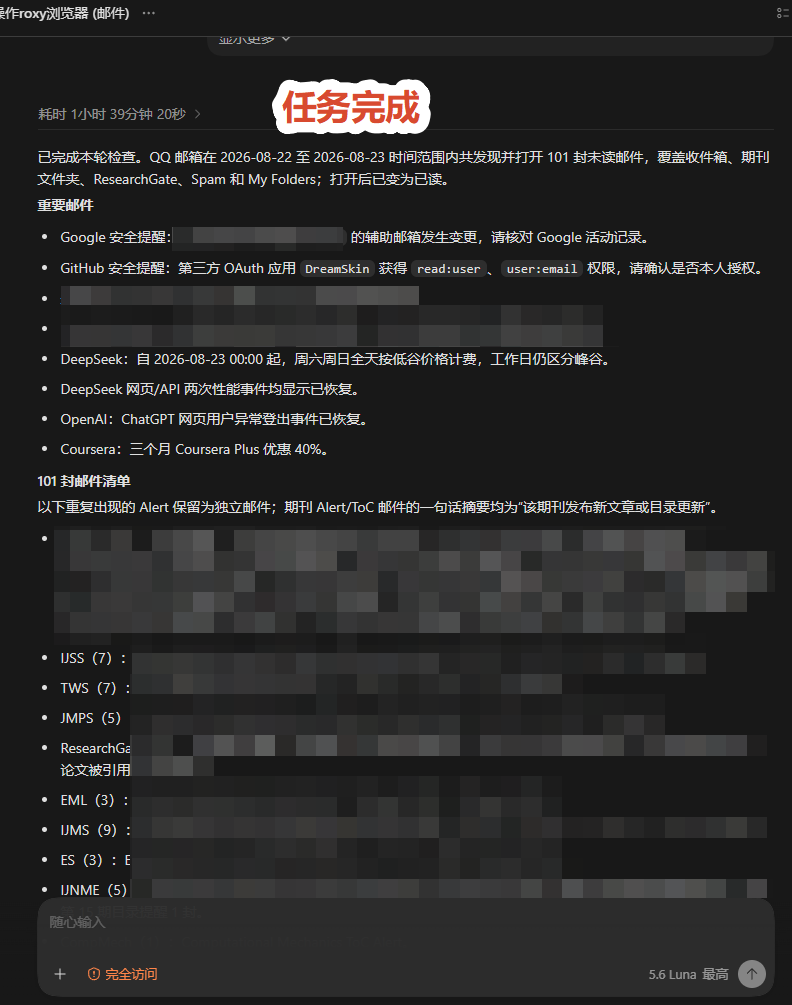
任务完成后，Codex 返回未读邮件、重要信息和筛选出的论文清单：

<figure style="margin:10px 0 16px 0;text-align:center;"> [![邮箱整理与论文筛选任务完成结果](https://docs.20020519.xyz/uploads/images/gallery/2026-08/page88-email-research-result-20260823.png)](https://docs.20020519.xyz/uploads/images/gallery/2026-08/page88-email-research-result-20260823.png) <figcaption style="text-align:center;color:#57606a;font-size:0.9em;margin-top:6px;">图 28：任务完成，返回邮件重点、论文筛选结果和待人工处理事项。</figcaption></figure>**案例要点：**邮件读取、分类、摘要和论文初筛可以交给 Codex；发送、删除、下载以及遇到 CAPTCHA 时，应由用户确认或手动接管。

</details>#### 重复流程与人工接管

- **重复网页操作：**按明确规则填写表单、查询多条记录、整理后台条目或批量处理可逆任务；遇到异常就停下。
- **随时接管：**登录、验证码、二次验证、敏感信息填写或最终提交时可自行操作，再交回 Codex 继续。

---